Esx DJ Script | Playlists, Control Music & Stream Audio in FiveM
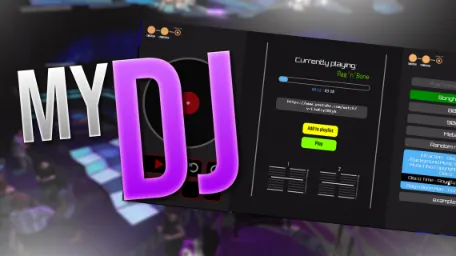
The ESX DJ Script allows players to create custom playlists, control music playback with features like autoplay, pause, skip, and volume adjustment, and integrate YouTube, Discord, or radio streams for immersive DJ experiences.
The Esx DJ Script brings music to life in your FiveM RP nightclub or event venue. Let players act as DJs with a sleek interface, live song control, playlists, and synced audio. Create the ultimate party vibe with this essential roleplay script for immersive club scenes and social hangouts.
Features of myDJ:
– You can create as many playlists as you want
-> When you select a song from a playlist, the next title will automatically start playing when the selected song is over -> Autoplay function
– Insert and delete songs from playlists very easy with one click
– You can set up zones for the DJ desks with configurable volume ranges
– There are buttons to pause the music, to skip some seconds, to rewind and to change the volume
– Due to the integration of the xsound API you can simply listen to every youtube video or discord, radio stream/file.
Need help?
If you have any other questions or issues related to this product, you can contact us. This script works well with our Esx Boombox System for enhanced roleplay communication
Visit if you’re looking for anything regarding this RedM script
Frequently Asked Questions
How do I install Esx DJ Script | Playlists, Control Music & Stream Audio in FiveM on my FiveM server?
Download after purchase, extract to resources folder, add ensure esx-dj-script to server.cfg, restart server.
Is Esx DJ Script | Playlists, Control Music & Stream Audio in FiveM compatible with QBCore and ESX?
Yes, fully compatible with QBCore, ESX, QBox, and standalone FiveM servers.
Does Esx DJ Script | Playlists, Control Music & Stream Audio in FiveM include free updates?
Yes, all scripts include lifetime free updates and dedicated support.
{“@context”:”https://schema.org”,”@type”:”FAQPage”,”mainEntity”:[{“@type”:”Question”,”name”:”How do I install Esx DJ Script | Playlists, Control Music & Stream Audio in FiveM on my FiveM server?”,”acceptedAnswer”:{“@type”:”Answer”,”text”:”Download after purchase, extract to your resources folder, add ‘ensure esx-dj-script’ to server.cfg, then restart your server.”}},{“@type”:”Question”,”name”:”Is Esx DJ Script | Playlists, Control Music & Stream Audio in FiveM compatible with QBCore and ESX?”,”acceptedAnswer”:{“@type”:”Answer”,”text”:”Yes, Esx DJ Script | Playlists, Control Music & Stream Audio in FiveM is fully compatible with QBCore, ESX, QBox, and Standalone FiveM servers.”}},{“@type”:”Question”,”name”:”Does Esx DJ Script | Playlists, Control Music & Stream Audio in FiveM include free updates?”,”acceptedAnswer”:{“@type”:”Answer”,”text”:”Yes, all FiveM scripts from fivemscripts.shop include lifetime free updates and dedicated support.”}}]}
Reviews
There are no reviews yet.
Be the first to review “Esx DJ Script | Playlists, Control Music & Stream Audio in FiveM” Cancel reply







Reviews
There are no reviews yet.