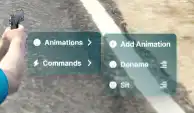
Qbcore Context Menu Script enhances FiveM servers by providing an interactive quick-action menu for players. With easy access to animations, commands, and essential functions, this script improves roleplay efficiency. Players can swiftly execute actions like emotes, commands, or interactions without complex key binds, making gameplay more immersive and user-friendly.
Features
- Submenu options, you can add infinite submenus!
- Options can have submenu and event on same time!
- Condition label (You can change options label with condition without create any other options.)
- Self clickable!
- Fast actions. (This script comes with default options named “Fast Actions”, player can create fast actions for animations and commands!)
- Sprites for zones.
- Realtime check options. (Example you right click to player and one option requires police job. If your job change this option appear/disappear with animation from menu.)
- And other features from qb-target!
- canInteract option for check any condtions you typed!
- Global options for entites, vehicle bones, vehicles, players, peds and self interactions.
Usage (Player)
- Hold left alt key to show cursor.
- Bring cursor to any thing with interactable options. (If thing have any options you can show eye image at corsor’s top left.)
- Right click to access thing’s menu.
- Now you can take your hand from left alt key.
- Click to any option for interact.
5.1. If option has right arrow icon at right, on left click you will access submenu of option.
5.2. If option has menu icon at right, on left click you will trigger option’s event. On right click you will access to option’s submenu.
5.3 If option not has any icon at right on left click you will trigger option’s event.
Need help?
If you have any other questions or issues related to this product, you can contact us. This script Works well with our Qbcore Job Center Script for enhanced roleplay interactions.
Visit if you’re looking for anything regarding this RedM script
Frequently Asked Questions
- How do I install Qbcore context menu Script | Right-Click Interaction System FiveM on my FiveM server?
- Download after purchase, extract to resources folder, add ensure qbcore-context-menu-script to server.cfg, restart server.
- Is Qbcore context menu Script | Right-Click Interaction System FiveM compatible with QBCore and ESX?
- Yes, fully compatible with QBCore, ESX, QBox, and standalone FiveM servers.
- Does Qbcore context menu Script | Right-Click Interaction System FiveM include free updates?
- Yes, all scripts include lifetime free updates and dedicated support.
{“@context”:”https://schema.org”,”@type”:”FAQPage”,”mainEntity”:[{“@type”:”Question”,”name”:”How do I install Qbcore context menu Script | Right-Click Interaction System FiveM on my FiveM server?”,”acceptedAnswer”:{“@type”:”Answer”,”text”:”Download after purchase, extract to your resources folder, add ‘ensure qbcore-context-menu-script’ to server.cfg, then restart your server.”}},{“@type”:”Question”,”name”:”Is Qbcore context menu Script | Right-Click Interaction System FiveM compatible with QBCore and ESX?”,”acceptedAnswer”:{“@type”:”Answer”,”text”:”Yes, Qbcore context menu Script | Right-Click Interaction System FiveM is fully compatible with QBCore, ESX, QBox, and Standalone FiveM servers.”}},{“@type”:”Question”,”name”:”Does Qbcore context menu Script | Right-Click Interaction System FiveM include free updates?”,”acceptedAnswer”:{“@type”:”Answer”,”text”:”Yes, all FiveM scripts from fivemscripts.shop include lifetime free updates and dedicated support.”}}]}





Reviews
There are no reviews yet.