Esx Hud System | Responsive & HUD for Player Stats
The Esx Hud Systemoffers a clean, responsive, and customizable HUD exclusively for ESX servers. It features draggable and resizable elements, animated microphone, player stats, job info, and financial data—optimized for performance with autosave settings and full OneSync Infinity support.
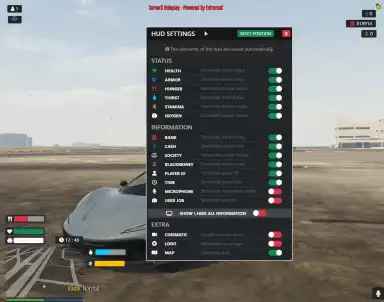
The ESX HUD System enhances your FiveM server with a modern, customizable heads-up display. Players can view and toggle health, armor, hunger, thirst, stamina, and oxygen levels. Featuring a user-friendly settings menu, position memory, and smooth integration with ESX status systems, it provides clean and immersive roleplay functionality.
Feature:
Working only with ESX
Responsive design
Draggable hud elements
Sizeable hud settings
Switch onoff a single or all hud elements
Autosave elements position in player local data
Autosave switch status in player local data
Autosave elements display status in player local data
Animated microphone while talking
Status and needs: Health, Hunger, Thirst, Stamina, Oxygen, Armor
Player information
Bank, Cash, Society, Dirty, Player Job, Player Id, Time, Microphone
Extra
Logo, Map, Cinematic mode
Well optimized (resmon 0.01 ms – 0.04 ms)
Lightweight and simple design
Connected with fontawesome
Easy to configure and modify
Working with Onesync Infinity
Need help?
If you have any other questions or issues related to this product, you can contact us. This script works well with our Esx FPS Counter Script for enhanced roleplay communication
Visit if you’re looking for anything regarding this RedM script
Frequently Asked Questions
How do I install Esx Hud System | Responsive & HUD for Player Stats on my FiveM server?
Download after purchase, extract to resources folder, add ensure esx-hud-system to server.cfg, restart server.
Is Esx Hud System | Responsive & HUD for Player Stats compatible with QBCore and ESX?
Yes, fully compatible with QBCore, ESX, QBox, and standalone FiveM servers.
Does Esx Hud System | Responsive & HUD for Player Stats include free updates?
Yes, all scripts include lifetime free updates and dedicated support.
{“@context”:”https://schema.org”,”@type”:”FAQPage”,”mainEntity”:[{“@type”:”Question”,”name”:”How do I install Esx Hud System | Responsive & HUD for Player Stats on my FiveM server?”,”acceptedAnswer”:{“@type”:”Answer”,”text”:”Download after purchase, extract to your resources folder, add ‘ensure esx-hud-system’ to server.cfg, then restart your server.”}},{“@type”:”Question”,”name”:”Is Esx Hud System | Responsive & HUD for Player Stats compatible with QBCore and ESX?”,”acceptedAnswer”:{“@type”:”Answer”,”text”:”Yes, Esx Hud System | Responsive & HUD for Player Stats is fully compatible with QBCore, ESX, QBox, and Standalone FiveM servers.”}},{“@type”:”Question”,”name”:”Does Esx Hud System | Responsive & HUD for Player Stats include free updates?”,”acceptedAnswer”:{“@type”:”Answer”,”text”:”Yes, all FiveM scripts from fivemscripts.shop include lifetime free updates and dedicated support.”}}]}
Reviews
There are no reviews yet.
Be the first to review “Esx Hud System | Responsive & HUD for Player Stats” Cancel reply








Reviews
There are no reviews yet.