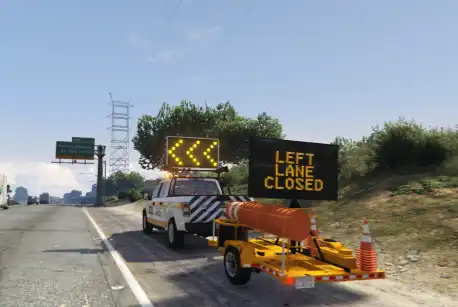
The Qbcore Traffic Trailer Script allows players to control and display dynamic traffic signs on traffic trailers. It features realistic sign rotation animations, automatic message updates, and compatibility with both vehicles and on-foot interactions. Players must align properly with the trailer for commands to work. The script also supports manual attachment for better functionality, ensuring smooth operation for roleplay and traffic management.
The QBCore Traffic Trailer Script enhances FiveM roleplay with realistic traffic management tools, including deployable traffic trailers with dynamic LED signs. Players can control road closures, direct traffic, and improve highway safety for emergency and construction roleplay scenarios. Ideal for law enforcement, public works, and immersive server interactions.
Features
When you have the sign rotated and switch to a different message you’ll see the animation for the sign rotating again after the message changes. This is out of my control. It has to do with how Extras are turned on & off when switching the message.
For the script to work, the trailer must be behind your vehicle OR you must be facing the trailer if on foot
The angle of the trailer compared to your vehicle/ped may prevent the script from working. If you try a command and you get notified that the trailer could not be found, try moving your vehicle to a different angle from the trailer. Straight on (directly in front of) the trailer should always work.
There is no /trdetach command because the default button (press & hold H) seems to work fine. In my experience, the attaching did not work automatically so I added the attach command.
Need help?
If you have any other questions or issues related to this product, you can contact us. This script works well with our Qbcore Emergency Lights System for enhanced roleplay communication
Visit if you’re looking for anything regarding this RedM script
Frequently Asked Questions
How do I install Qbcore Traffic Trailer Scriot – Road Sign & Traffic Management on my FiveM server?
Download after purchase, extract to resources folder, add ensure qbcore-traffic-trailer-scriot to server.cfg, restart server.
Is Qbcore Traffic Trailer Scriot – Road Sign & Traffic Management compatible with QBCore and ESX?
Yes, fully compatible with QBCore, ESX, QBox, and standalone FiveM servers.
Does Qbcore Traffic Trailer Scriot – Road Sign & Traffic Management include free updates?
Yes, all scripts include lifetime free updates and dedicated support.
{“@context”:”https://schema.org”,”@type”:”FAQPage”,”mainEntity”:[{“@type”:”Question”,”name”:”How do I install Qbcore Traffic Trailer Scriot – Road Sign & Traffic Management on my FiveM server?”,”acceptedAnswer”:{“@type”:”Answer”,”text”:”Download after purchase, extract to your resources folder, add ‘ensure qbcore-traffic-trailer-scriot’ to server.cfg, then restart your server.”}},{“@type”:”Question”,”name”:”Is Qbcore Traffic Trailer Scriot – Road Sign & Traffic Management compatible with QBCore and ESX?”,”acceptedAnswer”:{“@type”:”Answer”,”text”:”Yes, Qbcore Traffic Trailer Scriot – Road Sign & Traffic Management is fully compatible with QBCore, ESX, QBox, and Standalone FiveM servers.”}},{“@type”:”Question”,”name”:”Does Qbcore Traffic Trailer Scriot – Road Sign & Traffic Management include free updates?”,”acceptedAnswer”:{“@type”:”Answer”,”text”:”Yes, all FiveM scripts from fivemscripts.shop include lifetime free updates and dedicated support.”}}]}
Reviews
There are no reviews yet.
Be the first to review “Qbcore Traffic Trailer Scriot – Road Sign & Traffic Management” Cancel reply






Reviews
There are no reviews yet.