Qbcore Advanced Clothings – Clothing Market System
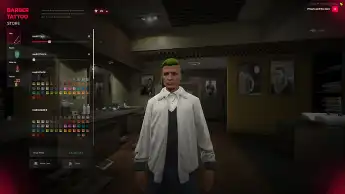
The Qbcore Advanced Clothings script is a highly customizable wardrobe and clothing market system for Qbcore, allowing players to manage clothing options efficiently. It features configurable wardrobe settings, adjustable prices, customizable categories, and blacklist options. With four different save systems (savestyle) and inventory integration, it provides seamless customization for an immersive roleplay experience.
The QBCore Advanced Clothings System offers players in FiveM an immersive experience with a wide array of customization options. From hairstyles and tattoos to outfit selection, this interface ensures a personalized touch to your roleplay character. Optimize your server’s roleplay experience with this advanced clothing and customization system.
Features
You can toggle the wardrobe usage setting on the config
All prices can be adjusted via config.
All categories can be turned on or off.
All item pictures and names can be changed in order.
You can set the base system you use and
You can use 4 different save systems with “savestyle”
Here we see the adjustments we can make.
Market name, Market coords,drawtext,marker settings and category setting can be set in Config.
You can set separate name, price and picture for each item.
You can turn on/off the increase coefficient of the items and the category.
You can block the clothing item you don’t want with the blacklist.
You can integrate it into your own system with the customedit function. (Example inventory systems, etc.)
Need help?
If you have any other questions or issues related to this product, you can contact us. This script works well with our Qbcore Appearance Menu for enhanced roleplay communication
Visit if you’re looking for anything regarding this RedM script
Frequently Asked Questions
How do I install Qbcore Advanced Clothings – Clothing Market System on my FiveM server?
Download after purchase, extract to resources folder, add ensure qbcore-advanced-clothings to server.cfg, restart server.
Is Qbcore Advanced Clothings – Clothing Market System compatible with QBCore and ESX?
Yes, fully compatible with QBCore, ESX, QBox, and standalone FiveM servers.
Does Qbcore Advanced Clothings – Clothing Market System include free updates?
Yes, all scripts include lifetime free updates and dedicated support.
{“@context”:”https://schema.org”,”@type”:”FAQPage”,”mainEntity”:[{“@type”:”Question”,”name”:”How do I install Qbcore Advanced Clothings – Clothing Market System on my FiveM server?”,”acceptedAnswer”:{“@type”:”Answer”,”text”:”Download after purchase, extract to your resources folder, add ‘ensure qbcore-advanced-clothings’ to server.cfg, then restart your server.”}},{“@type”:”Question”,”name”:”Is Qbcore Advanced Clothings – Clothing Market System compatible with QBCore and ESX?”,”acceptedAnswer”:{“@type”:”Answer”,”text”:”Yes, Qbcore Advanced Clothings – Clothing Market System is fully compatible with QBCore, ESX, QBox, and Standalone FiveM servers.”}},{“@type”:”Question”,”name”:”Does Qbcore Advanced Clothings – Clothing Market System include free updates?”,”acceptedAnswer”:{“@type”:”Answer”,”text”:”Yes, all FiveM scripts from fivemscripts.shop include lifetime free updates and dedicated support.”}}]}
Reviews
There are no reviews yet.
Be the first to review “Qbcore Advanced Clothings – Clothing Market System” Cancel reply



 Qbcore Advanced Clothings – C...



Reviews
There are no reviews yet.