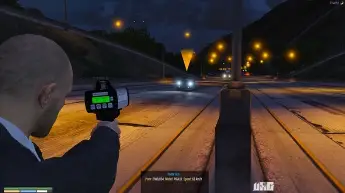
ESX Radar Gun Script provides a functional radar gun for your FiveM server, allowing players to measure vehicle speeds. Perfect for law enforcement roleplay, this script lets officers enforce speed limits, create tickets, and interact with vehicles realistically, enhancing the immersive experience for players on traffic patrol
Keybinds
- Press Y to open the menu thing (Remember to have your radargun in your hands)
- Press E to take measurement
Installation
- Download the resource from the link above
- Drag the Radargun resource into your Resources folder
- Add start Radargun into Server.cfg
- Now you are good to go <3
Radargun includes
- Radargun Skin
- Config File
- Awesome UI
- Change between MPH and KMH
- Sound when taking a measurement
Update
- Huge Improvements!
- Added an UI:)
- Removed option for Drawmarkers/Since i made it dosent tick all the time. So Drawmarker is not Updating asap!
- Removed Draw’s
- Removed so it wont show plate and model
- You can choose how many Decimals you want behinde Range. (Find it in html/init.js – First line)
Need help?
If you have any other questions or issues related to this product, you can contact us. This script works well with our Esx Traffic Tickets Script for enhanced roleplay communication
Visit if you’re looking for anything regarding this RedM script
Frequently Asked Questions
- How do I install Esx Radar Gun Script | Speed Detection and Measurement FiveM on my FiveM server?
- Download after purchase, extract to resources folder, add ensure esx-radar-gun-script to server.cfg, restart server.
- Is Esx Radar Gun Script | Speed Detection and Measurement FiveM compatible with QBCore and ESX?
- Yes, fully compatible with QBCore, ESX, QBox, and standalone FiveM servers.
- Does Esx Radar Gun Script | Speed Detection and Measurement FiveM include free updates?
- Yes, all scripts include lifetime free updates and dedicated support.
{“@context”:”https://schema.org”,”@type”:”FAQPage”,”mainEntity”:[{“@type”:”Question”,”name”:”How do I install Esx Radar Gun Script | Speed Detection and Measurement FiveM on my FiveM server?”,”acceptedAnswer”:{“@type”:”Answer”,”text”:”Download after purchase, extract to your resources folder, add ‘ensure esx-radar-gun-script’ to server.cfg, then restart your server.”}},{“@type”:”Question”,”name”:”Is Esx Radar Gun Script | Speed Detection and Measurement FiveM compatible with QBCore and ESX?”,”acceptedAnswer”:{“@type”:”Answer”,”text”:”Yes, Esx Radar Gun Script | Speed Detection and Measurement FiveM is fully compatible with QBCore, ESX, QBox, and Standalone FiveM servers.”}},{“@type”:”Question”,”name”:”Does Esx Radar Gun Script | Speed Detection and Measurement FiveM include free updates?”,”acceptedAnswer”:{“@type”:”Answer”,”text”:”Yes, all FiveM scripts from fivemscripts.shop include lifetime free updates and dedicated support.”}}]}

 Esx Radar Gun Script | Speed D...

Reviews
There are no reviews yet.