Esx Public Transport AI | Bus Routes & Public Transport System
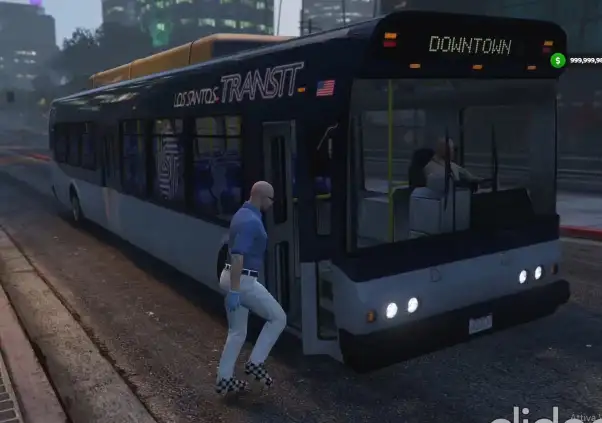
The ESX Public Transport AI script allows buses to drive dynamically based on player proximity, simulating movement when no players are near. It lets you create and customize bus routes through simple configuration, with an easy-to-use route baking system and map blips to track routes in-game.
The ESX Public Transport AI Script introduces a fully functional public bus system with AI drivers. Players can ride between key locations using realistic transit routes and bus stops. Ideal for immersive city roleplay, this system reduces car reliance and adds a true-to-life public transportation feature to your FiveM server.
No more out of scope entity management
If one or more players are close enough to a bus, you will see a bus driving around.
When no players are close enough to a bus, the server will simulate its position based on the baked data.
Add custom routes
Open config.lua and create a new route like in the example. IMPORTANT NOTES:
always add the route at the end of the Config.Routes table
when adding a new stop in the busStops array, avoid to get the position in the middle of a crossroad
Once you’ve done it, restart the resource and use the command /bake routeId, where routeId is the position of the route in the Config.Routes table.
As soon as the bake is done (check client console for errors), you will see on the map some blips indicating the route just calculated (for few seconds) and a file will be saved in /bake_data/baked_routes/.
Do a /refresh since there are a new files, and /restart publictransprot.
You are done. Everything should start working fine.
Need help?
If you have any other questions or issues related to this product, you can contact us. This script works well with our Esx Metro System for enhanced roleplay communication
Visit if you’re looking for anything regarding this RedM script
Frequently Asked Questions
How do I install Esx Public Transport AI | Bus Routes & Public Transport System on my FiveM server?
Download after purchase, extract to resources folder, add ensure esx-public-transport-ai to server.cfg, restart server.
Is Esx Public Transport AI | Bus Routes & Public Transport System compatible with QBCore and ESX?
Yes, fully compatible with QBCore, ESX, QBox, and standalone FiveM servers.
Does Esx Public Transport AI | Bus Routes & Public Transport System include free updates?
Yes, all scripts include lifetime free updates and dedicated support.
{“@context”:”https://schema.org”,”@type”:”FAQPage”,”mainEntity”:[{“@type”:”Question”,”name”:”How do I install Esx Public Transport AI | Bus Routes & Public Transport System on my FiveM server?”,”acceptedAnswer”:{“@type”:”Answer”,”text”:”Download after purchase, extract to your resources folder, add ‘ensure esx-public-transport-ai’ to server.cfg, then restart your server.”}},{“@type”:”Question”,”name”:”Is Esx Public Transport AI | Bus Routes & Public Transport System compatible with QBCore and ESX?”,”acceptedAnswer”:{“@type”:”Answer”,”text”:”Yes, Esx Public Transport AI | Bus Routes & Public Transport System is fully compatible with QBCore, ESX, QBox, and Standalone FiveM servers.”}},{“@type”:”Question”,”name”:”Does Esx Public Transport AI | Bus Routes & Public Transport System include free updates?”,”acceptedAnswer”:{“@type”:”Answer”,”text”:”Yes, all FiveM scripts from fivemscripts.shop include lifetime free updates and dedicated support.”}}]}
Reviews
There are no reviews yet.
Be the first to review “Esx Public Transport AI | Bus Routes & Public Transport System” Cancel reply



 Esx Public Transport AI | Bus ...




Reviews
There are no reviews yet.