Esx Car Shop | Integration for Vehicle Purchases & Redemption
The Esx Car Shopscript integrates with your database and Tebex for seamless in-game vehicle purchases. Players can redeem items, weapons, cash, bank balances, and vehicles using their Tebex transaction ID. Easy setup, full automation, and a customizable configuration for a smooth car shop experience.
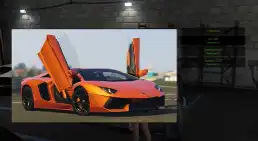
This ESX car shop script lets you display and customize high-end vehicles like the Lamborghini Aventador with Lambo doors in your FiveM server. Featuring detailed car models and a realistic user interface, the script provides an immersive car dealership experience for car enthusiasts and roleplayers.
Features-
Links with your database to push purchase right from Tebex to ingame! Full automation!
Player does /redeem then puts their Tebex transaction ID to redeem ingame!
Can put – Items, Weapons, Cash balance, Bank balance and all Vehicles!
Vehicles are done VERY easy just add them to your shared/vehicles.lua and set shop to “donorshop” then add 1 field so you get a picture!
Huge config with Lots of options to help you set it up exactly like you want!
Script is protected under FiveM’s Escrow asset protection, If you want anything added let me know and most likely we can just update the main resource or make specific changes for you!
Need help?
If you have any other questions or issues related to this product, you can contact us. This script works well with our Esx Plate Changer Script for enhanced roleplay communication
Visit if you’re looking for anything regarding this RedM script
Frequently Asked Questions
How do I install Esx Car Shop | Integration for Vehicle Purchases & Redemption on my FiveM server?
Download after purchase, extract to resources folder, add ensure esx-car-shop to server.cfg, restart server.
Is Esx Car Shop | Integration for Vehicle Purchases & Redemption compatible with QBCore and ESX?
Yes, fully compatible with QBCore, ESX, QBox, and standalone FiveM servers.
Does Esx Car Shop | Integration for Vehicle Purchases & Redemption include free updates?
Yes, all scripts include lifetime free updates and dedicated support.
{“@context”:”https://schema.org”,”@type”:”FAQPage”,”mainEntity”:[{“@type”:”Question”,”name”:”How do I install Esx Car Shop | Integration for Vehicle Purchases & Redemption on my FiveM server?”,”acceptedAnswer”:{“@type”:”Answer”,”text”:”Download after purchase, extract to your resources folder, add ‘ensure esx-car-shop’ to server.cfg, then restart your server.”}},{“@type”:”Question”,”name”:”Is Esx Car Shop | Integration for Vehicle Purchases & Redemption compatible with QBCore and ESX?”,”acceptedAnswer”:{“@type”:”Answer”,”text”:”Yes, Esx Car Shop | Integration for Vehicle Purchases & Redemption is fully compatible with QBCore, ESX, QBox, and Standalone FiveM servers.”}},{“@type”:”Question”,”name”:”Does Esx Car Shop | Integration for Vehicle Purchases & Redemption include free updates?”,”acceptedAnswer”:{“@type”:”Answer”,”text”:”Yes, all FiveM scripts from fivemscripts.shop include lifetime free updates and dedicated support.”}}]}
Reviews
There are no reviews yet.
Be the first to review “Esx Car Shop | Integration for Vehicle Purchases & Redemption” Cancel reply




Reviews
There are no reviews yet.