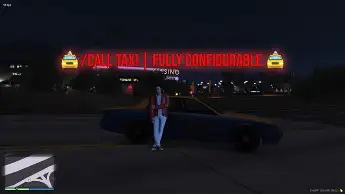
The ESX Call Taxi Script allows players to request taxis with customizable features, including vehicle spawn names, adjustable wait times, and pricing options. It offers in-vehicle calling, configurable commands, and integrates Discord logs for server management, providing a seamless taxi experience in FiveM roleplay servers.
The ESX Call Taxi Script brings a realistic taxi service to GTA V RP, letting players hail cabs or work as drivers. With integrated fare calculations, dispatch notifications, and advanced vehicle management, this script adds immersive roleplay dynamics. It’s fully configurable to fit server needs, offering a seamless taxi experience.
Features:
Customizable Taxi Vehicle: Select the desired taxi vehicle spawn name.
Flexible Taxi Spawn Distance: Set the maximum distance from the player that the taxi will spawn.
Adjustable Wait Time: Define the time interval between the taxi request and its arrival, allowing for customization to suit your server’s needs.
Command Configuration: Customize the command name and cooldown time, providing smooth and seamless access to the NPC Taxi service.
In-Vehicle Calling Option: Enable or disable the ability to call a taxi while inside a vehicle, ensuring roleplay consistency and convenience.
Pricing System: Set the price for the taxi service, with options to use in-game currency types such as money, bank, or black money.
Discord Logs Integration: Logs sent to your specified Discord webhook, ensuring accountability and server management.
0.00ms IDLE / 0.01ms on command use.
Need help?
If you have any other questions or issues related to this product, you can contact us. This script works well with our Esx Taxi Job Script for enhanced roleplay communication
Visit if you’re looking for anything regarding this RedM script
Frequently Asked Questions
How do I install Esx call taxi Script | FiveM Taxi Job System & Vehicle Request on my FiveM server?
Download after purchase, extract to resources folder, add ensure esx-call-taxi-script to server.cfg, restart server.
Is Esx call taxi Script | FiveM Taxi Job System & Vehicle Request compatible with QBCore and ESX?
Yes, fully compatible with QBCore, ESX, QBox, and standalone FiveM servers.
Does Esx call taxi Script | FiveM Taxi Job System & Vehicle Request include free updates?
Yes, all scripts include lifetime free updates and dedicated support.
{“@context”:”https://schema.org”,”@type”:”FAQPage”,”mainEntity”:[{“@type”:”Question”,”name”:”How do I install Esx call taxi Script | FiveM Taxi Job System & Vehicle Request on my FiveM server?”,”acceptedAnswer”:{“@type”:”Answer”,”text”:”Download after purchase, extract to your resources folder, add ‘ensure esx-call-taxi-script’ to server.cfg, then restart your server.”}},{“@type”:”Question”,”name”:”Is Esx call taxi Script | FiveM Taxi Job System & Vehicle Request compatible with QBCore and ESX?”,”acceptedAnswer”:{“@type”:”Answer”,”text”:”Yes, Esx call taxi Script | FiveM Taxi Job System & Vehicle Request is fully compatible with QBCore, ESX, QBox, and Standalone FiveM servers.”}},{“@type”:”Question”,”name”:”Does Esx call taxi Script | FiveM Taxi Job System & Vehicle Request include free updates?”,”acceptedAnswer”:{“@type”:”Answer”,”text”:”Yes, all FiveM scripts from fivemscripts.shop include lifetime free updates and dedicated support.”}}]}
Reviews
There are no reviews yet.
Be the first to review “Esx call taxi Script | FiveM Taxi Job System & Vehicle Request” Cancel reply


 Esx call taxi Script | FiveM T...


Reviews
There are no reviews yet.