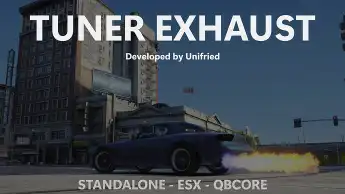
The ESX Tuner Exhaust Script enhances vehicle exhausts by adding flames, pop & bang sounds, and backfire effects. It includes extensive configuration options for flame size, sound variations, and upgrades, with support for anti-lag, 2Step, fuel tune, muffler removal, and more. The script is optimized, networked, and features custom sound support, item checks, and permissions for tuning and upgrades, providing a dynamic and immersive tuning experience for FiveM.
The ESX Tuner Exhaust Script offers customizable exhaust options for vehicles in your FiveM server. Players can modify their cars with new exhaust sounds and visual effects, such as flames or smoke. Perfect for tuning enthusiasts, this script adds a new level of vehicle personalization and excitement to your server.
Features:
Extensive Config (Found Below) that allows you to change flame variations, flame sizes, and how often they are generated (Just to name a few)
Sounds generated interact with the environment
Multiple variations of pop & bang sounds
Flames get bigger as the car is upgraded (More engine upgrades = bigger flames)
Support for anti-lag (Decreases the time between pops)
Support for 2Step (Allows flames when “limi bashing” or revving the engine)
Support for backfire (When slowing down / slower version of anti-lag for non turbo)
Support for fuel tune (Higher the fuel setting the higher chance of flames & sound)
Muffler System (Muffler is on by default and needs to be removed to hear pops & bangs)
Initial support for item checks (Tuning and cutting muffler)
Heavily Optimised (Sits on average when using the system – 0.05ms)
Fully Networked
Flame variations (Can be set so every flame is a different size or set so all flames are the same size)
Initial implementations of tunes saving (Saves tune to a plate – Can be expanded if requested – No database required)
Can change mod weighting (Increasing engine weighting etc will increase the chance of flames when the engine is upgraded)
Support for functional anti-lag (Turbo pressure is set)
Update:
Added support for Custom Sounds (Quite complex to achieve, i can assist broadly but won’t be implementing premade custom sounds into the script)
Added support for Notifications (Supports all systems, I can assist implementation)
Added support to change current sounds & particles
Added support for ace permissions (Each upgrade can have different permission requirements if needed, both this and item checks can work together if needed)
Added support for item checks for each upgrade (Each upgrade can require a certain item)
Added support for removing items on upgrade
Updated chat commands
Added support for 2Step to have different levels (Cause the system to engage earlier depending on config)
Added support for max flame size to change based on engine and turbo upgrades
Added support for max flame size to change based on model (Limited to either mod upgrade or model that impacts flame size, can’t have both)
Refactored codebase
Added support for easily changing the notification text & error text
Revamped the muffler system (Felt disconnected with the command, now mufflers are treated like a tune/upgrade)
Added /checktune [system] command to check what the current tune is set too
Added the ability to fine-select which sounds you want rather than all 41
Removed unnecessary time configs and combined them into single variables
Fixed some hidden bugs in the code
Improved config variable names
Spread config out over multiple files to make it easier to know what you are changing
Should have fixed a QBCORE compatibility issue
Introduced some optimisation into some logic statements
Need help?
If you have any other questions or issues related to this product, you can contact us. This script works well with our Esx Tuning Script for enhanced roleplay communication
Visit if you’re looking for anything regarding this RedM script
Frequently Asked Questions
How do I install Esx Tuner Exhaust Script | Flames, Sounds & Vehicle Tuning on my FiveM server?
Download after purchase, extract to resources folder, add ensure esx-tuner-exhaust-script to server.cfg, restart server.
Is Esx Tuner Exhaust Script | Flames, Sounds & Vehicle Tuning compatible with QBCore and ESX?
Yes, fully compatible with QBCore, ESX, QBox, and standalone FiveM servers.
Does Esx Tuner Exhaust Script | Flames, Sounds & Vehicle Tuning include free updates?
Yes, all scripts include lifetime free updates and dedicated support.
{“@context”:”https://schema.org”,”@type”:”FAQPage”,”mainEntity”:[{“@type”:”Question”,”name”:”How do I install Esx Tuner Exhaust Script | Flames, Sounds & Vehicle Tuning on my FiveM server?”,”acceptedAnswer”:{“@type”:”Answer”,”text”:”Download after purchase, extract to your resources folder, add ‘ensure esx-tuner-exhaust-script’ to server.cfg, then restart your server.”}},{“@type”:”Question”,”name”:”Is Esx Tuner Exhaust Script | Flames, Sounds & Vehicle Tuning compatible with QBCore and ESX?”,”acceptedAnswer”:{“@type”:”Answer”,”text”:”Yes, Esx Tuner Exhaust Script | Flames, Sounds & Vehicle Tuning is fully compatible with QBCore, ESX, QBox, and Standalone FiveM servers.”}},{“@type”:”Question”,”name”:”Does Esx Tuner Exhaust Script | Flames, Sounds & Vehicle Tuning include free updates?”,”acceptedAnswer”:{“@type”:”Answer”,”text”:”Yes, all FiveM scripts from fivemscripts.shop include lifetime free updates and dedicated support.”}}]}
Reviews
There are no reviews yet.
Be the first to review “Esx Tuner Exhaust Script | Flames, Sounds & Vehicle Tuning” Cancel reply


 Esx Tuner Exhaust Script | Fla...

Reviews
There are no reviews yet.