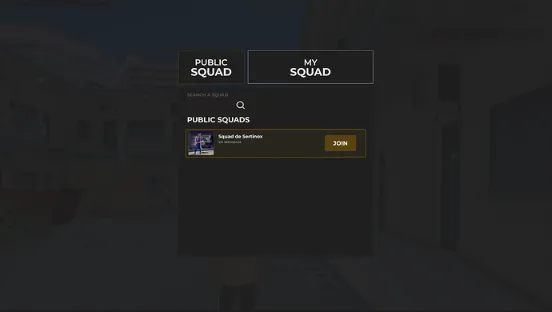
ESX Squad Script allows players to form squads with a maximum of four members and choose between private or public squads. It displays health and armor information above each member’s head and on a squad HUD. Squad members can also see each other’s locations on the map with direction indicators, and the HUD can be toggled for individual players.
The ESX Squad System enhances FiveM roleplay by allowing players to create, join, and manage squads. Featuring a user-friendly UI, public and private squads, and real-time team coordination, this script improves multiplayer interactions. Perfect for gangs, police, or tactical teams, ensuring organized gameplay and immersive roleplay experiences.
Features:
Compatible with all frameworks, making it a standalone feature.
Players have the ability to form squads, with a maximum of four members per squad.
The owner of a squad can choose to set it as either private or public.
Squad members can view their health and armor information displayed above their character’s head, as well as on the squad’s heads-up display (HUD).
The squad HUD can be toggled closed by individual players, providing them with the option to hide it.
Squad members can locate and identify each other on the in-game map through player blips, which also indicate the direction they are facing. This feature can be configured according to player preferences.
Need help?
If you have any other questions or issues related to this product, you can contact us. This script works well with our ESX Gang System for enhanced roleplay communication
Visit if you’re looking for anything regarding this RedM script
Frequently Asked Questions
How do I install ESX Squad System | Team Formation & HUD for FiveM on my FiveM server?
Download after purchase, extract to resources folder, add ensure esx-squad-system to server.cfg, restart server.
Is ESX Squad System | Team Formation & HUD for FiveM compatible with QBCore and ESX?
Yes, fully compatible with QBCore, ESX, QBox, and standalone FiveM servers.
Does ESX Squad System | Team Formation & HUD for FiveM include free updates?
Yes, all scripts include lifetime free updates and dedicated support.
{“@context”:”https://schema.org”,”@type”:”FAQPage”,”mainEntity”:[{“@type”:”Question”,”name”:”How do I install ESX Squad System | Team Formation & HUD for FiveM on my FiveM server?”,”acceptedAnswer”:{“@type”:”Answer”,”text”:”Download after purchase, extract to your resources folder, add ‘ensure esx-squad-system’ to server.cfg, then restart your server.”}},{“@type”:”Question”,”name”:”Is ESX Squad System | Team Formation & HUD for FiveM compatible with QBCore and ESX?”,”acceptedAnswer”:{“@type”:”Answer”,”text”:”Yes, ESX Squad System | Team Formation & HUD for FiveM is fully compatible with QBCore, ESX, QBox, and Standalone FiveM servers.”}},{“@type”:”Question”,”name”:”Does ESX Squad System | Team Formation & HUD for FiveM include free updates?”,”acceptedAnswer”:{“@type”:”Answer”,”text”:”Yes, all FiveM scripts from fivemscripts.shop include lifetime free updates and dedicated support.”}}]}
Reviews
There are no reviews yet.
Be the first to review “ESX Squad System | Team Formation & HUD for FiveM” Cancel reply




Reviews
There are no reviews yet.