Enhance your FiveM roleplay server with the ESX Call a Player for Discord script. This tool allows admins or staff to summon players directly to a Discord help channel via an on-screen message. Improve communication, ensure smoother support interactions, and streamline roleplay experiences effortlessly with this efficient script integration.
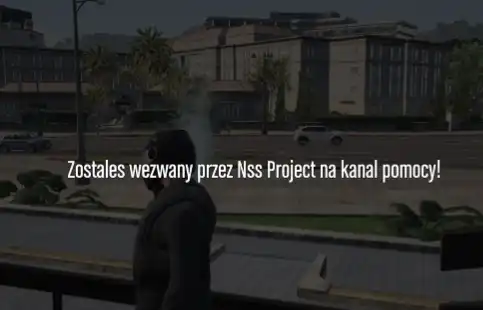
Esx Call a player for Discord with a message lets your admins display a NUI window with a custom text on the screen of the selected player.
This allows you to call your players into supportcalls without having to teleport to them or similar.
When the NUI is shown the player cannot move punch or shoot.
The NUI can be triggered either with commands (1. With a Message already set in the Config. 2. Where the message can be set when typing in the command.)
Or by triggering a event.
You can set up to five groups that are allowed to execute the commands you have set in the config.
You can customize the NUI to your liking for example by changing the colors in the CSS or by uploading your own logo.png into the HTML folder.
(webhok) Call a player for Discord with a message /wezwij [id] i na /offlinewezwij [dc id]
Need help?
If you have any other questions or issues related to this product, you can contact us. This script works well with our ESX Admin Ticket System for enhanced roleplay communication
Visit if you’re looking for anything regarding this RedM script
Frequently Asked Questions
- How do I install ESX Call a Player for Discord script on my FiveM server?
- Download after purchase, extract to resources folder, add ensure esx-call-a-player-for-discord-script to server.cfg, restart server.
- Is ESX Call a Player for Discord script compatible with QBCore and ESX?
- Yes, fully compatible with QBCore, ESX, QBox, and standalone FiveM servers.
- Does ESX Call a Player for Discord script include free updates?
- Yes, all scripts include lifetime free updates and dedicated support.
{“@context”:”https://schema.org”,”@type”:”FAQPage”,”mainEntity”:[{“@type”:”Question”,”name”:”How do I install ESX Call a Player for Discord script on my FiveM server?”,”acceptedAnswer”:{“@type”:”Answer”,”text”:”Download after purchase, extract to your resources folder, add ‘ensure esx-call-a-player-for-discord-script’ to server.cfg, then restart your server.”}},{“@type”:”Question”,”name”:”Is ESX Call a Player for Discord script compatible with QBCore and ESX?”,”acceptedAnswer”:{“@type”:”Answer”,”text”:”Yes, ESX Call a Player for Discord script is fully compatible with QBCore, ESX, QBox, and Standalone FiveM servers.”}},{“@type”:”Question”,”name”:”Does ESX Call a Player for Discord script include free updates?”,”acceptedAnswer”:{“@type”:”Answer”,”text”:”Yes, all FiveM scripts from fivemscripts.shop include lifetime free updates and dedicated support.”}}]}





Reviews
There are no reviews yet.