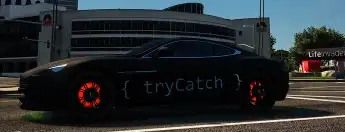
The Esx Glowing Brakediscs script for FiveM adds a unique and visually appealing feature to your server’s cars. With glowing brake discs that light up in various colors, this script enhances the aesthetics of custom vehicles, offering players a fresh visual experience that stands out in nighttime or high-speed driving scenarios.
- Burnout: rear brakediscs glow
- Braking: all brakediscs glow (front ones first)
/brakediscs disables glowing (locally)
This script uses the veh_exhaust_afterburner effect from core.
Matching wheelsize
You can add a entry for each vehicle in client.js:
const brakedisclocation = { //brakediscs array for every car
  "removeMe": {x: 0.0, s: 0.5},
  "example2": {x: 0.02, s: 0.4}
};
removeMe is the model name.
This is an example entry and can be removed.
There is a /discs command, helping you to align the effect.
It has to be enabled first (set devMode to true).
/discs x + = Increase width./discs x - = Decrease width./discs size + = Increase size./discs size - = Decrease size./discs reset = Sets the width and size back to default./discs done = Prints the alignment correctly formatted so you can copy it from your logs and paste it into client.js.
Changelog
- v3.0:
Recoded in JavaScript
Improved performance
Added custom effect (if you do not want it, delete the stream-folder
Effect now uses alpha for better fade-in and fade-out
- v2.0:
Removed glow effect when using handbrake
Everything is client side now, no more server sided tasks / calculations
You can set a size and width for every vehicle, so it matches the wheelsize
- v1.1:
Removed glow effect on helicopters, planes and boats
Fixed UseParticleFxAssetNextCall-error
Need help?
If you have any other questions or issues related to this product, you can contact us. This script works well with our ESX Tuning Scripts for enhanced roleplay communication
Visit if you’re looking for anything regarding this RedM script
Frequently Asked Questions
- How do I install Esx Glowing Brakediscs | Brake Glow Effects & Burnout Visuals on my FiveM server?
- Download after purchase, extract to resources folder, add ensure esx-glowing-brakediscs to server.cfg, restart server.
- Is Esx Glowing Brakediscs | Brake Glow Effects & Burnout Visuals compatible with QBCore and ESX?
- Yes, fully compatible with QBCore, ESX, QBox, and standalone FiveM servers.
- Does Esx Glowing Brakediscs | Brake Glow Effects & Burnout Visuals include free updates?
- Yes, all scripts include lifetime free updates and dedicated support.
{“@context”:”https://schema.org”,”@type”:”FAQPage”,”mainEntity”:[{“@type”:”Question”,”name”:”How do I install Esx Glowing Brakediscs | Brake Glow Effects & Burnout Visuals on my FiveM server?”,”acceptedAnswer”:{“@type”:”Answer”,”text”:”Download after purchase, extract to your resources folder, add ‘ensure esx-glowing-brakediscs’ to server.cfg, then restart your server.”}},{“@type”:”Question”,”name”:”Is Esx Glowing Brakediscs | Brake Glow Effects & Burnout Visuals compatible with QBCore and ESX?”,”acceptedAnswer”:{“@type”:”Answer”,”text”:”Yes, Esx Glowing Brakediscs | Brake Glow Effects & Burnout Visuals is fully compatible with QBCore, ESX, QBox, and Standalone FiveM servers.”}},{“@type”:”Question”,”name”:”Does Esx Glowing Brakediscs | Brake Glow Effects & Burnout Visuals include free updates?”,”acceptedAnswer”:{“@type”:”Answer”,”text”:”Yes, all FiveM scripts from fivemscripts.shop include lifetime free updates and dedicated support.”}}]}







Reviews
There are no reviews yet.