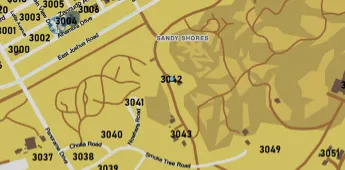
The ESX Nearest Postal Script enhances your FiveM server’s navigation by showing detailed postal zones on the in-game map. Perfect for EMS, police, and dispatch RP, it allows players to quickly identify and communicate exact locations. Fully ESX-compatible and great for improving realism, GPS accuracy, and RP coordination.
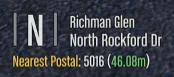
This is the nearest postal script, it shows your nearest postal below the PLD display and will also show you the distance from it. This can also draw a route from your location to a postal of your choice.
Installation
-
- Run the following command in a terminal
git clone https://github.com/blockba5her/nearest-postal.gitThere are 2 ways to install it, and I recommend the first
- As of now, this script supports 3 postal maps. From what I have seen, these are the most popular
new-postals.jsonold-postals.jsonocrp-postals.json
- To setup the postal map, open the
fxmanifest.lua file and change the variable postalFile to one of the files above
- NOTE: This defaults as the
new-postals.json file
Command
- To draw a route to a certain postal, type
/postal [postalName] and to remove just type /postal
- It will automatically remove the route when within 100m of the destination
Updates
1.5
- Major performance improvements
- Added the
refreshRate configuration option
- Simplified distance calculation logic
- Separated code into separate files
- Prebuild the postal list with vectors at startup
- Use FiveM Lua 5.4
1.4
- Performance Improvements
- New config options added
- Fix some tiny bugs (and leftover code)
1.3
- Improvements in selection of postal map
- Fix dev mode being on
1.2.1
- Fixes to missing postals on improved postal map
1.2
- Updates to README.md
- Version check
- Fixes for Improved Postal map
- Updates to dev API
1.1.1
- Fixed issue with blip name being set to nil, clearing the screen of all other text
1.1
- Added OCRP postals
- Added
config.lua file
Need help?
If you have any other questions or issues related to this product, you can contact us. This script works well with our Esx Waypoints Script for enhanced roleplay communication
Visit if you’re looking for anything regarding this RedM script
Frequently Asked Questions
- How do I install Esx Nearest Postal Script | Route & Postal Code Navigation FiveM on my FiveM server?
- Download after purchase, extract to resources folder, add ensure esx-narest-postal to server.cfg, restart server.
- Is Esx Nearest Postal Script | Route & Postal Code Navigation FiveM compatible with QBCore and ESX?
- Yes, fully compatible with QBCore, ESX, QBox, and standalone FiveM servers.
- Does Esx Nearest Postal Script | Route & Postal Code Navigation FiveM include free updates?
- Yes, all scripts include lifetime free updates and dedicated support.
{“@context”:”https://schema.org”,”@type”:”FAQPage”,”mainEntity”:[{“@type”:”Question”,”name”:”How do I install Esx Nearest Postal Script | Route & Postal Code Navigation FiveM on my FiveM server?”,”acceptedAnswer”:{“@type”:”Answer”,”text”:”Download after purchase, extract to your resources folder, add ‘ensure esx-narest-postal’ to server.cfg, then restart your server.”}},{“@type”:”Question”,”name”:”Is Esx Nearest Postal Script | Route & Postal Code Navigation FiveM compatible with QBCore and ESX?”,”acceptedAnswer”:{“@type”:”Answer”,”text”:”Yes, Esx Nearest Postal Script | Route & Postal Code Navigation FiveM is fully compatible with QBCore, ESX, QBox, and Standalone FiveM servers.”}},{“@type”:”Question”,”name”:”Does Esx Nearest Postal Script | Route & Postal Code Navigation FiveM include free updates?”,”acceptedAnswer”:{“@type”:”Answer”,”text”:”Yes, all FiveM scripts from fivemscripts.shop include lifetime free updates and dedicated support.”}}]}




Reviews
There are no reviews yet.