Esx Advanced Text UI Script | Customizable & Dynamic UI with
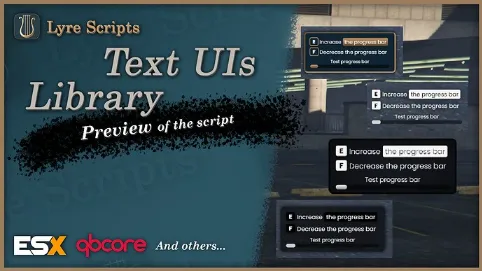
The ESX Advanced Text UI Script provides a dynamic and customizable text UI system with beautiful animations. It supports multiple UI types like text, keyboard prompts, and progress bars and allows easy management through exports. With a theme system, standalone functionality, and 0.00ms client-side usage, it enhances the user interface with smooth and interactive elements for FiveM.
The ESX Advanced Text UI Script allows developers to create interactive and customizable text-based user interfaces in FiveM. Featuring progress bars and easy-to-use UI elements, this script supports multiple frameworks like ESX and QBCore. It’s perfect for adding engaging, functional text-based interactions to your server for various activities.
Features
Easy to use: The script uses simple exports, you will find a short user guide below to help you understand how it works
Theme system: The script can be customized as desired, we have created 5 themes by default but you are free to create your own theme reflecting your server
Several types of textui: Our script provides several types of Text UIs, you can display simple text with the “text” type, a keyboard key to press with “keyboard” and a progress bar with “progress”
Dynamic: Manage your TextUIs dynamically, you just have to add TextUIs and they will appear, delete them and they will disappear. No need to worry about showing or hiding the NUI interface, the script automatically hides the interface when there is no text displayed
Beautiful animations: The text design is filled with animations to beautify everything! The script adapts perfectly to the number of active TextUIs
Standalone: The script works independently of any resource, no need to worry about your framework!
Optimized: The script is very optimized, it consumes 0.00ms on the client side.
HOW TO USE IT ?
addTextUI : Allows add a Text UI.
removeTextUI : Allow you to remove a specific Text UI.
setStyleArgs : Provides interaction with certain styling features.
editTextUI : Allow edit an existing Text UI
There are several types of instructions that you can display on the text UI with the addTextUI export:
text : This represents simple text, which can be formatted with HTML code.
keyboard : This represents a key, followed by text.
progress : This represents a progress bar.
Need help?
If you have any other questions or issues related to this product, you can contact us. This script works well with our Esx Notification script for enhanced roleplay communication
Visit if you’re looking for anything regarding this RedM script
Frequently Asked Questions
How do I install Esx Advanced Text UI Script | Customizable & Dynamic UI with on my FiveM server?
Download after purchase, extract to resources folder, add ensure esx-advanced-text-ui-script to server.cfg, restart server.
Is Esx Advanced Text UI Script | Customizable & Dynamic UI with compatible with QBCore and ESX?
Yes, fully compatible with QBCore, ESX, QBox, and standalone FiveM servers.
Does Esx Advanced Text UI Script | Customizable & Dynamic UI with include free updates?
Yes, all scripts include lifetime free updates and dedicated support.
{“@context”:”https://schema.org”,”@type”:”FAQPage”,”mainEntity”:[{“@type”:”Question”,”name”:”How do I install Esx Advanced Text UI Script | Customizable & Dynamic UI with on my FiveM server?”,”acceptedAnswer”:{“@type”:”Answer”,”text”:”Download after purchase, extract to your resources folder, add ‘ensure esx-advanced-text-ui-script’ to server.cfg, then restart your server.”}},{“@type”:”Question”,”name”:”Is Esx Advanced Text UI Script | Customizable & Dynamic UI with compatible with QBCore and ESX?”,”acceptedAnswer”:{“@type”:”Answer”,”text”:”Yes, Esx Advanced Text UI Script | Customizable & Dynamic UI with is fully compatible with QBCore, ESX, QBox, and Standalone FiveM servers.”}},{“@type”:”Question”,”name”:”Does Esx Advanced Text UI Script | Customizable & Dynamic UI with include free updates?”,”acceptedAnswer”:{“@type”:”Answer”,”text”:”Yes, all FiveM scripts from fivemscripts.shop include lifetime free updates and dedicated support.”}}]}
Reviews
There are no reviews yet.
Be the first to review “Esx Advanced Text UI Script | Customizable & Dynamic UI with” Cancel reply





Reviews
There are no reviews yet.