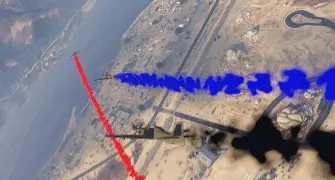
ESX Aircraft Smoke Script enables players to add colorful smoke trails to their aircraft in FiveM. Ideal for airshows, stunts, or combat, this script enhances the visual experience by allowing customizable smoke effects. It adds a dynamic element to aviation, perfect for roleplay scenarios, enhancing excitement and immersion in the air
I wanted to share with you a nice plugin/script that you can use in demonstration planes. There are separate files for OneSync servers and separate files for Normal servers. If you install the Normal script on the OneSync server, it will not work. Likewise, if you install the OneSync version of the script on a Normal, Licenseless server, it will not work. In other words, download and install the appropriate file according to the type of your server. In the OneSync version of the script, sync works with all players, that is, all players in the region see the colored smoke and work in sync.
Setup;
- We start the script by typing start planesmokeOneSync into server.cfg. In the same way, you will use the version of the script for normal servers, we start by typing start planesmoke.
Need help?
If you have any other questions or issues related to this product, you can contact us. This script works well with our Esx Jet Display Script for enhanced roleplay communication
Visit if you’re looking for anything regarding this RedM script
Frequently Asked Questions
- How do I install Esx Aircraft Smoke | Add Colored Smoke Effects to Planes in FiveM on my FiveM server?
- Download after purchase, extract to resources folder, add ensure esx-aircraft-smoke to server.cfg, restart server.
- Is Esx Aircraft Smoke | Add Colored Smoke Effects to Planes in FiveM compatible with QBCore and ESX?
- Yes, fully compatible with QBCore, ESX, QBox, and standalone FiveM servers.
- Does Esx Aircraft Smoke | Add Colored Smoke Effects to Planes in FiveM include free updates?
- Yes, all scripts include lifetime free updates and dedicated support.
{“@context”:”https://schema.org”,”@type”:”FAQPage”,”mainEntity”:[{“@type”:”Question”,”name”:”How do I install Esx Aircraft Smoke | Add Colored Smoke Effects to Planes in FiveM on my FiveM server?”,”acceptedAnswer”:{“@type”:”Answer”,”text”:”Download after purchase, extract to your resources folder, add ‘ensure esx-aircraft-smoke’ to server.cfg, then restart your server.”}},{“@type”:”Question”,”name”:”Is Esx Aircraft Smoke | Add Colored Smoke Effects to Planes in FiveM compatible with QBCore and ESX?”,”acceptedAnswer”:{“@type”:”Answer”,”text”:”Yes, Esx Aircraft Smoke | Add Colored Smoke Effects to Planes in FiveM is fully compatible with QBCore, ESX, QBox, and Standalone FiveM servers.”}},{“@type”:”Question”,”name”:”Does Esx Aircraft Smoke | Add Colored Smoke Effects to Planes in FiveM include free updates?”,”acceptedAnswer”:{“@type”:”Answer”,”text”:”Yes, all FiveM scripts from fivemscripts.shop include lifetime free updates and dedicated support.”}}]}


 Esx Aircraft Smoke | Add Color...


Reviews
There are no reviews yet.