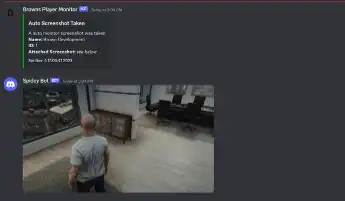
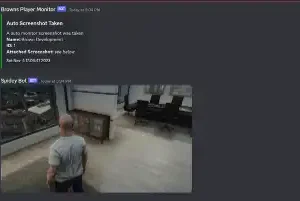
The Esx Auto Screenshot Player Monitor Script enhances FiveM server moderation by automatically capturing player screenshots at set intervals or triggered events. This tool helps admins track player behavior, prevent cheating, and maintain server integrity. Fully integrated with Discord notifications, it ensures real-time monitoring for a secure roleplay environment.
How Does It Work?:
- Players with permissions to use the command that you set in config.lua can do the chat command:
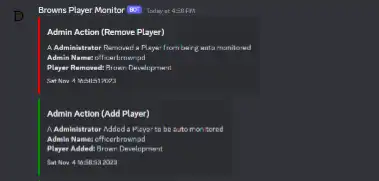
/ssmonitor [playerId] [“add”/“remove”]
When they execute this command it will send a discord log that tell you who the admin is that added/removed this player from being auto monitored.
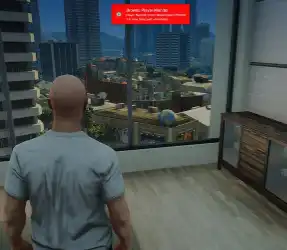
Once the player is added to be auto monitored then after every minute (or however many minutes you set in config.lua) the player will be screenshotted and the screenshot will be sent to discord via webhook
Need help?
If you have any other questions or issues related to this product, you can contact us. This script works well with our ESX Admin System for enhanced roleplay communication
Visit if you’re looking for anything regarding this RedM script
Frequently Asked Questions
- How do I install Esx Auto Screenshot Player Monitor Script on my FiveM server?
- Download after purchase, extract to resources folder, add ensure esx-auto-screenshot-player-monitor-script to server.cfg, restart server.
- Is Esx Auto Screenshot Player Monitor Script compatible with QBCore and ESX?
- Yes, fully compatible with QBCore, ESX, QBox, and standalone FiveM servers.
- Does Esx Auto Screenshot Player Monitor Script include free updates?
- Yes, all scripts include lifetime free updates and dedicated support.
{“@context”:”https://schema.org”,”@type”:”FAQPage”,”mainEntity”:[{“@type”:”Question”,”name”:”How do I install Esx Auto Screenshot Player Monitor Script on my FiveM server?”,”acceptedAnswer”:{“@type”:”Answer”,”text”:”Download after purchase, extract to your resources folder, add ‘ensure esx-auto-screenshot-player-monitor-script’ to server.cfg, then restart your server.”}},{“@type”:”Question”,”name”:”Is Esx Auto Screenshot Player Monitor Script compatible with QBCore and ESX?”,”acceptedAnswer”:{“@type”:”Answer”,”text”:”Yes, Esx Auto Screenshot Player Monitor Script is fully compatible with QBCore, ESX, QBox, and Standalone FiveM servers.”}},{“@type”:”Question”,”name”:”Does Esx Auto Screenshot Player Monitor Script include free updates?”,”acceptedAnswer”:{“@type”:”Answer”,”text”:”Yes, all FiveM scripts from fivemscripts.shop include lifetime free updates and dedicated support.”}}]}



 Esx Auto Screenshot Player Mon...

Reviews
There are no reviews yet.