Esx Camera Menu | Customizable Camera System FiveM
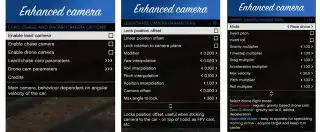
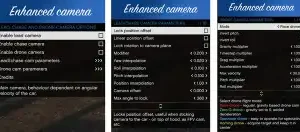
The ESX Camera Menu adds an advanced and customizable camera system for FiveM, featuring lead, chase, and drone camera modes with adjustable FOV, XYZ offsets, interpolation values, and camera movement settings. It includes saving/loading presets, allowing players to fine-tune their camera experience for better vehicle and environmental tracking.
The Esx Camera Menu provides advanced camera controls for FiveM, allowing players to adjust various settings, including camera angles, zoom levels, and position offsets. Perfect for cinematic shots or in-depth vehicle perspectives, this script enhances the visual experience and offers full customization for better immersion in your server
Features
Lead camera – main camera, rotates around car dependant on angular velocity of the vehicle
Chase camera – focuses on closest vehicle and points towards it
Drone camera – simulates drone physics, allows choice between different modes (race, zero-G, spectator, homing)
Customizable parameters – FOV, XYZ position offsets, interpolation values and more
Saving/loading – save and load camera parameters or choose from default presets
Parameters overview
It’s best to just experiment with parameters to see how they affect camera handling (for lead/chase camera you can start by spawning a preset from submenu).
camera parameters:
Lock position offset – determines whether camera changes position compared to vehicle (or just rotates)
Linear position offset – experimental feature, camera changes position along the line drawn behind vehicle instead of doing circular motion around the car
Lock rotation to camera plane – changes the way that camera rotates around car (mostly visible on uneven ground)
Modifier – this modifier * angular velocity = target rotation. Higher values make camera move further from lock. (-1,1)
Yaw interpolation – lower values – smoother movement along yaw axis (0,1)
Roll interpolation – lower values – smoother movement along roll axis (0,1)
Pitch interpolation – lower values – smoother movement along pitch axis (0,1)
Camera offset – offsets chase camera target towards its velocity vector. (0,5)
FOV – changes field of view, may affect performance with higher values (20,120)
X/Y/Z Offset – static position offset in XYZ direction
Max angle to lock – for chase camera only, max angle from velocity vector to keep the lock on, if angle exceeds this limit, camera switches back to normal. (25,360)
Need help?
If you have any other questions or issues related to this product, you can contact us. This script works well with our ESX Polaroid Camera Script for enhanced roleplay communication
Visit if you’re looking for anything regarding this RedM script
Frequently Asked Questions
How do I install Esx Camera Menu | Customizable Camera System FiveM on my FiveM server?
Download after purchase, extract to resources folder, add ensure esx-camera-menu to server.cfg, restart server.
Is Esx Camera Menu | Customizable Camera System FiveM compatible with QBCore and ESX?
Yes, fully compatible with QBCore, ESX, QBox, and standalone FiveM servers.
Does Esx Camera Menu | Customizable Camera System FiveM include free updates?
Yes, all scripts include lifetime free updates and dedicated support.
{“@context”:”https://schema.org”,”@type”:”FAQPage”,”mainEntity”:[{“@type”:”Question”,”name”:”How do I install Esx Camera Menu | Customizable Camera System FiveM on my FiveM server?”,”acceptedAnswer”:{“@type”:”Answer”,”text”:”Download after purchase, extract to your resources folder, add ‘ensure esx-camera-menu’ to server.cfg, then restart your server.”}},{“@type”:”Question”,”name”:”Is Esx Camera Menu | Customizable Camera System FiveM compatible with QBCore and ESX?”,”acceptedAnswer”:{“@type”:”Answer”,”text”:”Yes, Esx Camera Menu | Customizable Camera System FiveM is fully compatible with QBCore, ESX, QBox, and Standalone FiveM servers.”}},{“@type”:”Question”,”name”:”Does Esx Camera Menu | Customizable Camera System FiveM include free updates?”,”acceptedAnswer”:{“@type”:”Answer”,”text”:”Yes, all FiveM scripts from fivemscripts.shop include lifetime free updates and dedicated support.”}}]}
Reviews
There are no reviews yet.
Be the first to review “Esx Camera Menu | Customizable Camera System FiveM” Cancel reply


 Esx Camera Menu | Customizable...

Reviews
There are no reviews yet.