Esx Computer | In-Game Virtual Desktop with RP Apps & Job Tools
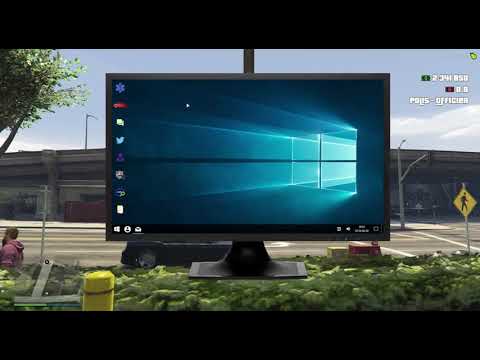
The Esx Computerscript adds an immersive in-game computer system with multiple apps like medical records, a mini Twitter, job center, admin tools, email, calculator, and command prompt. Includes job-specific features, vehicle showcases, and full ESX integration for boss actions and user control.
The ESX Computer script brings a realistic in-game desktop environment to your FiveM server. It replicates a Windows-style interface, letting players access apps like police records, social media, emails, and more. Ideal for PD, businesses, or custom jobs. Fully customizable, visually clean, and adds deep immersion to roleplay servers.
There are a couple of small built-in programs to show examples of what you can do:
Medical records
A basic forum for the players current job
Admin panel to add/delete/modify users
Twitter:
A really basic replica of Twitter that lets you tweet.
Car dealer:
Shows pictures of vehicles, vehicles can be blacklisted in the programs javascript
Employees
Boss actions for the logged in users job. Only available if you have ESX installed.
Job center
Shows available jobs.
Command prompt
Calcylator
Folders
Mail
Need help?
If you have any other questions or issues related to this product, you can contact us. This script works well with our Esx Dark Website Script for enhanced roleplay communication
Visit if you’re looking for anything regarding this RedM script
Frequently Asked Questions
How do I install Esx Computer | In-Game Virtual Desktop with RP Apps & Job Tools on my FiveM server?
Download after purchase, extract to resources folder, add ensure esx-computer to server.cfg, restart server.
Is Esx Computer | In-Game Virtual Desktop with RP Apps & Job Tools compatible with QBCore and ESX?
Yes, fully compatible with QBCore, ESX, QBox, and standalone FiveM servers.
Does Esx Computer | In-Game Virtual Desktop with RP Apps & Job Tools include free updates?
Yes, all scripts include lifetime free updates and dedicated support.
{“@context”:”https://schema.org”,”@type”:”FAQPage”,”mainEntity”:[{“@type”:”Question”,”name”:”How do I install Esx Computer | In-Game Virtual Desktop with RP Apps & Job Tools on my FiveM server?”,”acceptedAnswer”:{“@type”:”Answer”,”text”:”Download after purchase, extract to your resources folder, add ‘ensure esx-computer’ to server.cfg, then restart your server.”}},{“@type”:”Question”,”name”:”Is Esx Computer | In-Game Virtual Desktop with RP Apps & Job Tools compatible with QBCore and ESX?”,”acceptedAnswer”:{“@type”:”Answer”,”text”:”Yes, Esx Computer | In-Game Virtual Desktop with RP Apps & Job Tools is fully compatible with QBCore, ESX, QBox, and Standalone FiveM servers.”}},{“@type”:”Question”,”name”:”Does Esx Computer | In-Game Virtual Desktop with RP Apps & Job Tools include free updates?”,”acceptedAnswer”:{“@type”:”Answer”,”text”:”Yes, all FiveM scripts from fivemscripts.shop include lifetime free updates and dedicated support.”}}]}
Reviews
There are no reviews yet.
Be the first to review “Esx Computer | In-Game Virtual Desktop with RP Apps & Job Tools” Cancel reply





Reviews
There are no reviews yet.