Esx Emote menu | Animations & Emote System for FiveM
The ESX Emote Menu offers 6000+ animations and a custom emote pack, with preview gifs for each animation. It supports custom keybinds, walks, facial expressions, and animation invites. The script is fully translatable, optimized, and features idlecam, resuming animations, and configurable settings for various emotes, with frequent updates and added categories like Animal and Prop Emotes.
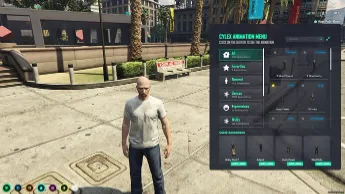
The ESX Emote Menu Script introduces an interactive animation system to GTA V RP, allowing players to access a variety of emotes. From dancing to gestures, this script enhances roleplay immersion with a user-friendly menu. Seamlessly integrated into FiveM, it provides smooth, engaging interactions for social and roleplay scenarios.
Features
+6000 animation with custom emote pack!
You can use the script on any framework.
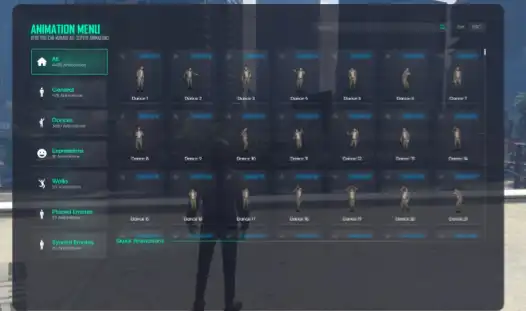
Almost all animations have gifs. This way you can preview the animations without using them.
Fully translatable anims and menu texts.
Client & Server optimized.
/idlecam command for disable idle animations
Walks and facial expressions are saving, and when you exit the game and re-enter, you continue with the same walk and the same facial expression.
You can assign animation cancel to any key.
Custom invite system and custom invite notification.
Fully new animation positioning!
You can use the animation yourself with a left click, send an invite with a right click, preview the animation on a clone by clicking on the mouse wheel (animpos)
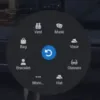
You can assign the animations, walks and facial expressions you want to a shortcut like the inventory item shortcut (e.g. SHIFT + NUM1)
Resmon is 0.00 ms idle, 0.02 ms on animation.
UPDATE
Escrow & Custom Emote Bundle price is increased.
Now gifs are not broken when the emote name is changed.
Fixed a few erp animations.
Now the names of dances can be translated.
Now dances are sorted by number in the menu.
Fixed fall damage prevention with scenario cancellation when punching, climbing, standing up, shooting.
The category section has been changed to scroll, now you can add as many categories as you want, the design will not be broken.
Added 98 new couple emotes, 25 new poses.
Added 2 new categories as Animal Emotes and Prop Emotes.
Some scripts were breaking the animpos keys at the bottom right, fixed.
Added /animpos [name] and client export to enter animpos.
You can now prevent them from using animpos in certain situations via config.
You can now turn off the use of animation in the vehicle via config.
Animpos opening while falling has been turned off.
Animpos no longer opens in the car.
Fixed teleporting under the map while in the Animpos.
You can now toggle walking on/off when the menu is open via config.
You can now minimize the menu to the right with the button.
UPDATE 1.8
Removed broken gangsigns and props.
Removed most of the unnecessary dances.
Added 3 new camp chair animations.
Added new axe and pickaxe animations.
Shared are now in a separate category.
There is now a sign on the animations showing whether they are shared or not.
Gif loading have been made smooth.
FullBody has been added to animSettings.
Fixed some ptxes were showing black colour or ptfxcolor was not working.
Fixed the problem that caused the animpos to stay inside the walls.
Fixed an issue where scripts like chat would open when typing in the search box.
Missing gifs have been added in the animal category and in general. (Missing ones will continue to be added)
Need help?
If you have any other questions or issues related to this product, you can contact us. This script Works well with our ESX Animations Script for enhanced roleplay interactions.
Visit if you’re looking for anything regarding this RedM script
Frequently Asked Questions
How do I install Esx Emote menu | Animations & Emote System for FiveM on my FiveM server?
Download after purchase, extract to resources folder, add ensure esx-emote-menu to server.cfg, restart server.
Is Esx Emote menu | Animations & Emote System for FiveM compatible with QBCore and ESX?
Yes, fully compatible with QBCore, ESX, QBox, and standalone FiveM servers.
Does Esx Emote menu | Animations & Emote System for FiveM include free updates?
Yes, all scripts include lifetime free updates and dedicated support.
{“@context”:”https://schema.org”,”@type”:”FAQPage”,”mainEntity”:[{“@type”:”Question”,”name”:”How do I install Esx Emote menu | Animations & Emote System for FiveM on my FiveM server?”,”acceptedAnswer”:{“@type”:”Answer”,”text”:”Download after purchase, extract to your resources folder, add ‘ensure esx-emote-menu’ to server.cfg, then restart your server.”}},{“@type”:”Question”,”name”:”Is Esx Emote menu | Animations & Emote System for FiveM compatible with QBCore and ESX?”,”acceptedAnswer”:{“@type”:”Answer”,”text”:”Yes, Esx Emote menu | Animations & Emote System for FiveM is fully compatible with QBCore, ESX, QBox, and Standalone FiveM servers.”}},{“@type”:”Question”,”name”:”Does Esx Emote menu | Animations & Emote System for FiveM include free updates?”,”acceptedAnswer”:{“@type”:”Answer”,”text”:”Yes, all FiveM scripts from fivemscripts.shop include lifetime free updates and dedicated support.”}}]}
Reviews
There are no reviews yet.
Be the first to review “Esx Emote menu | Animations & Emote System for FiveM” Cancel reply




Reviews
There are no reviews yet.