Esx Lockpick System | Lockpick Dealer & Purchase for FiveM
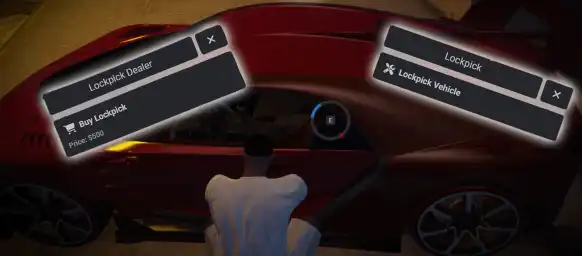
ESX Lockpick System introduces a lockpick dealer NPC where players can purchase lockpicks at a configurable price. The dealer’s location, pricing, animations, and availability can be fully customized through the config.lua. Players interact with the dealer using the ox_lib menu, and lockpicks are automatically added to their inventory upon purchase.
The ESX Lockpick System enhances FiveM criminal roleplay by allowing players to purchase and use lockpicks to break into vehicles. Featuring an interactive UI, success rate mechanics, and customizable settings, this script adds realism to car theft and burglary scenarios. Perfect for immersive criminal activities and economy-driven RP servers.
Features
Location: The lockpick dealer is situated at a specified location in the game world. You can adjust the coordinates in the configuration file
Price: Players can purchase lockpicks from the dealer at the setted price. The price can be adjusted in the configuration file.
Turn Off Option: You have the option to enable or disable the dealer through the configuration file.
Purchasing: Players can buy lockpicks from the dealer using in-game currency. The lockpicks are added to their inventory upon purchase.
Dealer Interaction: Players interact with the dealer via ox lib menu. The menu will display options to purchase lockpicks.
Configurable Settings: All key settings, such as dealer location, price, animation are configurable via the config.lua. This allows you to easily adjust the script to fit your server’s needs.
Need help?
If you have any other questions or issues related to this product, you can contact us. This script works well with our ESX Door Lock System for enhanced roleplay communication
Visit if you’re looking for anything regarding this RedM script
Frequently Asked Questions
How do I install Esx Lockpick System | Lockpick Dealer & Purchase for FiveM on my FiveM server?
Download after purchase, extract to resources folder, add ensure esx-lockpick-system to server.cfg, restart server.
Is Esx Lockpick System | Lockpick Dealer & Purchase for FiveM compatible with QBCore and ESX?
Yes, fully compatible with QBCore, ESX, QBox, and standalone FiveM servers.
Does Esx Lockpick System | Lockpick Dealer & Purchase for FiveM include free updates?
Yes, all scripts include lifetime free updates and dedicated support.
{“@context”:”https://schema.org”,”@type”:”FAQPage”,”mainEntity”:[{“@type”:”Question”,”name”:”How do I install Esx Lockpick System | Lockpick Dealer & Purchase for FiveM on my FiveM server?”,”acceptedAnswer”:{“@type”:”Answer”,”text”:”Download after purchase, extract to your resources folder, add ‘ensure esx-lockpick-system’ to server.cfg, then restart your server.”}},{“@type”:”Question”,”name”:”Is Esx Lockpick System | Lockpick Dealer & Purchase for FiveM compatible with QBCore and ESX?”,”acceptedAnswer”:{“@type”:”Answer”,”text”:”Yes, Esx Lockpick System | Lockpick Dealer & Purchase for FiveM is fully compatible with QBCore, ESX, QBox, and Standalone FiveM servers.”}},{“@type”:”Question”,”name”:”Does Esx Lockpick System | Lockpick Dealer & Purchase for FiveM include free updates?”,”acceptedAnswer”:{“@type”:”Answer”,”text”:”Yes, all FiveM scripts from fivemscripts.shop include lifetime free updates and dedicated support.”}}]}
Reviews
There are no reviews yet.
Be the first to review “Esx Lockpick System | Lockpick Dealer & Purchase for FiveM” Cancel reply



 Esx Lockpick System | Lockpick...

Reviews
There are no reviews yet.