Esx Malisling Script | Weapon Management & Attachment System
The ESX Malisling Script enhances weapon interactions in FiveM by syncing weapon attachments, flashlight states, and holster animations. It supports ESX, OX, and QB frameworks with low CPU usage and customizable features, such as weapon position, animations, jamming chances, and throwing power, allowing for immersive weapon management and customization.
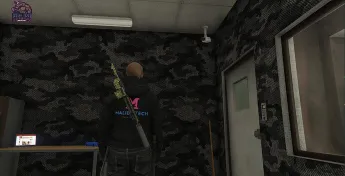
The ESX MaliSling Script introduces a realistic weapon sling system to GTA V RP, enabling players to carry firearms visibly on their backs. Integrated with the ESX framework, it fosters immersive roleplay by showcasing weapon possession in a lifelike manner. Ideal for servers seeking heightened realism and a polished player experience.
Features
ESX/OX/QB compatible
Very low CPU usage
Weapon attached to player based on type
Holster animation
Synced attachments
Flashlight state synced
Flashlight working on back
Jamming chance based on weapon state
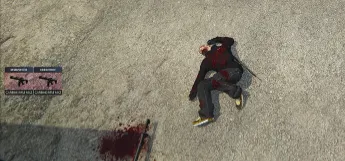
Equipped weapon drops on death
Export for dropping equipped weapon from hands
Throw weapons away ad turn them into drops
Easily config script with your own event to fit your needs
Customizable weapon position
Customizable weapon position for jobs and gender
Customizable animations
Customizable jamming chance
Customizable throwing power (based on weapon groups)
Customizable labels
Customizable notifications (Preset with ox_lib)
Customizable UI Help (Preset with ox_lib)
Customizable skillbar event(Preset with ox_lib)
Need help?
If you have any other questions or issues related to this product, you can contact us. This script works well with our Esx Wanted System for enhanced roleplay communication
Visit if you’re looking for anything regarding this RedM script
Frequently Asked Questions
How do I install Esx Malisling Script | Weapon Management & Attachment System on my FiveM server?
Download after purchase, extract to resources folder, add ensure esx-malisling-script to server.cfg, restart server.
Is Esx Malisling Script | Weapon Management & Attachment System compatible with QBCore and ESX?
Yes, fully compatible with QBCore, ESX, QBox, and standalone FiveM servers.
Does Esx Malisling Script | Weapon Management & Attachment System include free updates?
Yes, all scripts include lifetime free updates and dedicated support.
{“@context”:”https://schema.org”,”@type”:”FAQPage”,”mainEntity”:[{“@type”:”Question”,”name”:”How do I install Esx Malisling Script | Weapon Management & Attachment System on my FiveM server?”,”acceptedAnswer”:{“@type”:”Answer”,”text”:”Download after purchase, extract to your resources folder, add ‘ensure esx-malisling-script’ to server.cfg, then restart your server.”}},{“@type”:”Question”,”name”:”Is Esx Malisling Script | Weapon Management & Attachment System compatible with QBCore and ESX?”,”acceptedAnswer”:{“@type”:”Answer”,”text”:”Yes, Esx Malisling Script | Weapon Management & Attachment System is fully compatible with QBCore, ESX, QBox, and Standalone FiveM servers.”}},{“@type”:”Question”,”name”:”Does Esx Malisling Script | Weapon Management & Attachment System include free updates?”,”acceptedAnswer”:{“@type”:”Answer”,”text”:”Yes, all FiveM scripts from fivemscripts.shop include lifetime free updates and dedicated support.”}}]}
Reviews
There are no reviews yet.
Be the first to review “Esx Malisling Script | Weapon Management & Attachment System” Cancel reply





Reviews
There are no reviews yet.