The ESX Prop Alignment Menu provides a user-friendly interface to attach and align props to specific bones with full control over position and rotation. Ideal for custom animations, roleplay props, and visual effects, this script allows developers and admins to fine-tune object placement with real-time adjustments and precision.
Features
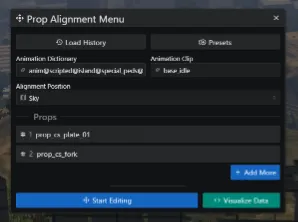
- Sleek & modern UI for all inputs along with smart validation.
- Supports multiple props.
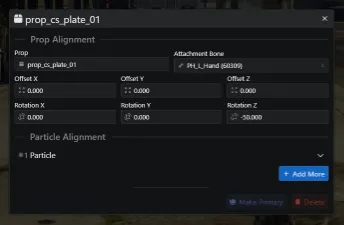
- Offset & rotation to player.
- Particle alignments offset from the prop.
- Possible to integrate into resources using exports, provide & return alignments with ease.
- Plays animation for realistic interactions, with different speeds.
- Server-wide presets to load pre-defined configurations.
- Export & import presets to share.
- Client-sided history to save your recent configurations.
- Visualize the data in Lua & JSON format for easy implementation.
Need help?
If you have any other questions or issues related to this product, you can contact us. This script works well with our Esx Scene Creator Script for enhanced roleplay communication
Visit if you’re looking for anything regarding this RedM script
Frequently Asked Questions
- How do I install Esx Prop Alignment menu | Prop Positioning & Rotation Tool on my FiveM server?
- Download after purchase, extract to resources folder, add ensure esx-prop-alignment-menu to server.cfg, restart server.
- Is Esx Prop Alignment menu | Prop Positioning & Rotation Tool compatible with QBCore and ESX?
- Yes, fully compatible with QBCore, ESX, QBox, and standalone FiveM servers.
- Does Esx Prop Alignment menu | Prop Positioning & Rotation Tool include free updates?
- Yes, all scripts include lifetime free updates and dedicated support.
{“@context”:”https://schema.org”,”@type”:”FAQPage”,”mainEntity”:[{“@type”:”Question”,”name”:”How do I install Esx Prop Alignment menu | Prop Positioning & Rotation Tool on my FiveM server?”,”acceptedAnswer”:{“@type”:”Answer”,”text”:”Download after purchase, extract to your resources folder, add ‘ensure esx-prop-alignment-menu’ to server.cfg, then restart your server.”}},{“@type”:”Question”,”name”:”Is Esx Prop Alignment menu | Prop Positioning & Rotation Tool compatible with QBCore and ESX?”,”acceptedAnswer”:{“@type”:”Answer”,”text”:”Yes, Esx Prop Alignment menu | Prop Positioning & Rotation Tool is fully compatible with QBCore, ESX, QBox, and Standalone FiveM servers.”}},{“@type”:”Question”,”name”:”Does Esx Prop Alignment menu | Prop Positioning & Rotation Tool include free updates?”,”acceptedAnswer”:{“@type”:”Answer”,”text”:”Yes, all FiveM scripts from fivemscripts.shop include lifetime free updates and dedicated support.”}}]}







Reviews
There are no reviews yet.