Qbcore Advanced Vehicle Key System | Realistic Car Key Control
The Qbcore Advanced Vehicle Key System is a realistic car key management script that allows players to remotely control their vehicles. It features custom key models, sound effects for engine start-up, and support for multiple vehicle brands like McLaren and Lamborghini. Players can lock/unlock cars, customize key positions, and configure key bindings via an INI file. The script enhances vehicle realism by requiring players to enter a vehicle first before using the key.
The Qbcore Advanced Vehicle Key System enhances FiveM servers with a realistic and secure car key management system. Players can lock, unlock, and share keys, adding depth to vehicle ownership and security. Fully integrated with Qbcore, this script improves immersion, making car interactions more engaging and realistic in roleplay.
What can does this script?
Better an image than thousand words, check the videos ;).
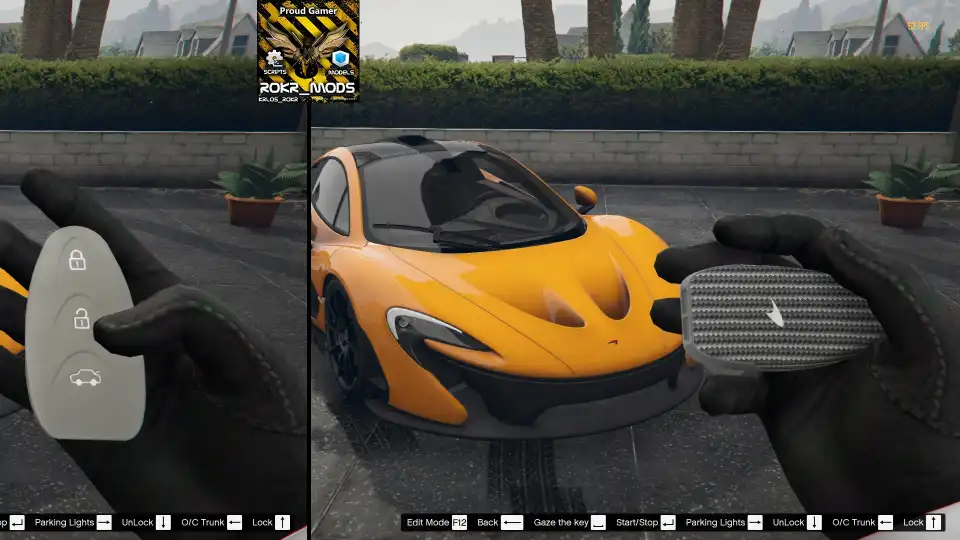
this is what it’s, a remote for control your vehicle.
Custom Sound for engine Start-Up (Included Aventador and SuperFast)
i modeled the keys my self
Only Mclaren P1, and Lamborghini Concept keys are included.
[F12]: Edit Mode, move key position (X,Y,Z), in future rotation.*Keyboard support only for edit mode*
You can add as many keys as you want, the script was designed with the idea to have the car key for every car brand, and custom ones.
You can customize the buttons via ini file, tutorial in future*.
Check last picture to setup your own Vehicles/Key
Need help?
If you have any other questions or issues related to this product, you can contact us. This script works well with our Qbcore Vehicle Registration Script for enhanced roleplay communication
Visit if you’re looking for anything regarding this RedM script
Frequently Asked Questions
How do I install Qbcore Advanced Vehicle Key System | Realistic Car Key Control on my FiveM server?
Download after purchase, extract to resources folder, add ensure qbcore-advanced-vehicle-key-system to server.cfg, restart server.
Is Qbcore Advanced Vehicle Key System | Realistic Car Key Control compatible with QBCore and ESX?
Yes, fully compatible with QBCore, ESX, QBox, and standalone FiveM servers.
Does Qbcore Advanced Vehicle Key System | Realistic Car Key Control include free updates?
Yes, all scripts include lifetime free updates and dedicated support.
{“@context”:”https://schema.org”,”@type”:”FAQPage”,”mainEntity”:[{“@type”:”Question”,”name”:”How do I install Qbcore Advanced Vehicle Key System | Realistic Car Key Control on my FiveM server?”,”acceptedAnswer”:{“@type”:”Answer”,”text”:”Download after purchase, extract to your resources folder, add ‘ensure qbcore-advanced-vehicle-key-system’ to server.cfg, then restart your server.”}},{“@type”:”Question”,”name”:”Is Qbcore Advanced Vehicle Key System | Realistic Car Key Control compatible with QBCore and ESX?”,”acceptedAnswer”:{“@type”:”Answer”,”text”:”Yes, Qbcore Advanced Vehicle Key System | Realistic Car Key Control is fully compatible with QBCore, ESX, QBox, and Standalone FiveM servers.”}},{“@type”:”Question”,”name”:”Does Qbcore Advanced Vehicle Key System | Realistic Car Key Control include free updates?”,”acceptedAnswer”:{“@type”:”Answer”,”text”:”Yes, all FiveM scripts from fivemscripts.shop include lifetime free updates and dedicated support.”}}]}
Reviews
There are no reviews yet.
Be the first to review “Qbcore Advanced Vehicle Key System | Realistic Car Key Control” Cancel reply



 Qbcore Advanced Vehicle Key Sy...



Reviews
There are no reviews yet.