Qbcore boom box Script – Music Playback with Playlist Sharing
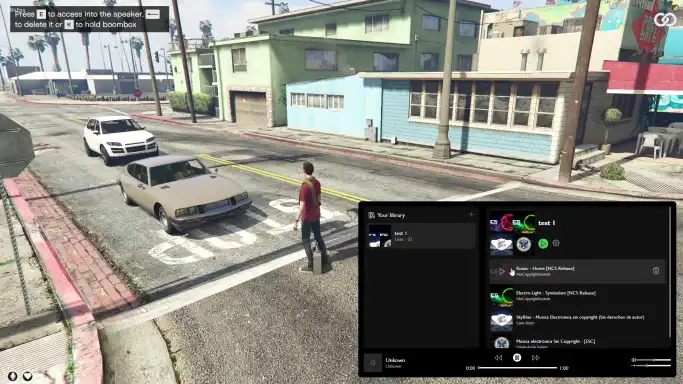
The Qbcore Boom Box Script allows players to create and share playlists, with synchronized music playback across multiple speakers. Features include volume control, song skipping, and distance-based volume adjustments. The script automatically advances to the next song when one ends and can move the boombox to different locations, creating an interactive and immersive music experience for players.
The QBCore Boom Box Script adds an interactive music player system to FiveM, allowing players to play custom tracks or radio stations through boom boxes. Fully customizable, this script enhances the roleplay environment, offering music for events, parties, or street gatherings. Perfect for enhancing atmosphere and player engagement in FiveM.
Features:
Create all the playlists that you want
Share your favourite playlist sharing the id with other players
Own synchronization to manage the state of the current song
Manage the time of the song that is playing
Next song and previus songs button
Slide to control the distance that the boombox can sound
Slide to control the volume of the boombox
Automatic volume down and up depending on the distance you are
When the song in the playlist ends, it automatically goes to the next song and synchronizes it with all the players
Multiple speakers can play at the same time
Option to move the boombox
Need help?
If you have any other questions or issues related to this product, you can contact us. This script works well with our Qbcore Music Box Script for enhanced roleplay communication
Visit if you’re looking for anything regarding this RedM script
Frequently Asked Questions
How do I install Qbcore boom box Script – Music Playback with Playlist Sharing on my FiveM server?
Download after purchase, extract to resources folder, add ensure qbcore-boom-box-script to server.cfg, restart server.
Is Qbcore boom box Script – Music Playback with Playlist Sharing compatible with QBCore and ESX?
Yes, fully compatible with QBCore, ESX, QBox, and standalone FiveM servers.
Does Qbcore boom box Script – Music Playback with Playlist Sharing include free updates?
Yes, all scripts include lifetime free updates and dedicated support.
{“@context”:”https://schema.org”,”@type”:”FAQPage”,”mainEntity”:[{“@type”:”Question”,”name”:”How do I install Qbcore boom box Script – Music Playback with Playlist Sharing on my FiveM server?”,”acceptedAnswer”:{“@type”:”Answer”,”text”:”Download after purchase, extract to your resources folder, add ‘ensure qbcore-boom-box-script’ to server.cfg, then restart your server.”}},{“@type”:”Question”,”name”:”Is Qbcore boom box Script – Music Playback with Playlist Sharing compatible with QBCore and ESX?”,”acceptedAnswer”:{“@type”:”Answer”,”text”:”Yes, Qbcore boom box Script – Music Playback with Playlist Sharing is fully compatible with QBCore, ESX, QBox, and Standalone FiveM servers.”}},{“@type”:”Question”,”name”:”Does Qbcore boom box Script – Music Playback with Playlist Sharing include free updates?”,”acceptedAnswer”:{“@type”:”Answer”,”text”:”Yes, all FiveM scripts from fivemscripts.shop include lifetime free updates and dedicated support.”}}]}
Reviews
There are no reviews yet.
Be the first to review “Qbcore boom box Script – Music Playback with Playlist Sharing” Cancel reply







Reviews
There are no reviews yet.