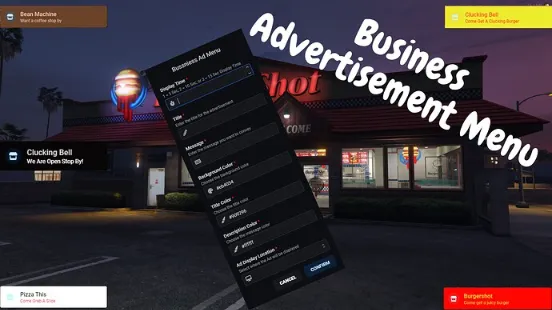
The QBCore Business Advertisement Script allows players to create and manage in-game advertisements for their businesses. This feature enhances server economy and interaction, providing an immersive experience for both businesses and players. With an easy-to-use interface and customization options, this script takes your FiveM roleplay to the next level.
Features
- Job-Specific Access: Only jobs that you specify in the
config.lua file can access and use this advertisement menu.
- Flexible Display Time: You can choose the display duration for the advertisement from a set of options. By default, the choices are 5 seconds, 10 seconds, and 15 seconds. You have the flexibility to modify these durations in the
config.lua file.
- Variable Pricing: Each display time option comes with its own price. Shorter durations are more affordable, while longer durations are relatively more expensive.
- Customizable Ad Layout: Business owners have the freedom to design their advertisements according to their preferences.
- Discord Embed: You can add a webhook which will send an embed with the advertisement information. This was only added for the case someone post something they shouldn’t and you would like to know who it was.
Need help?
If you have any other questions or issues related to this product, you can contact us. This script works well with our Qbcore NPC Dialogs System for enhanced roleplay communication
Visit if you’re looking for anything regarding this RedM script
Frequently Asked Questions
- How do I install QBCore Business Advertisement Script – Display & Job-Based on my FiveM server?
- Download after purchase, extract to resources folder, add ensure qbcore-business-advertisement-script to server.cfg, restart server.
- Is QBCore Business Advertisement Script – Display & Job-Based compatible with QBCore and ESX?
- Yes, fully compatible with QBCore, ESX, QBox, and standalone FiveM servers.
- Does QBCore Business Advertisement Script – Display & Job-Based include free updates?
- Yes, all scripts include lifetime free updates and dedicated support.
{“@context”:”https://schema.org”,”@type”:”FAQPage”,”mainEntity”:[{“@type”:”Question”,”name”:”How do I install QBCore Business Advertisement Script – Display & Job-Based on my FiveM server?”,”acceptedAnswer”:{“@type”:”Answer”,”text”:”Download after purchase, extract to your resources folder, add ‘ensure qbcore-business-advertisement-script’ to server.cfg, then restart your server.”}},{“@type”:”Question”,”name”:”Is QBCore Business Advertisement Script – Display & Job-Based compatible with QBCore and ESX?”,”acceptedAnswer”:{“@type”:”Answer”,”text”:”Yes, QBCore Business Advertisement Script – Display & Job-Based is fully compatible with QBCore, ESX, QBox, and Standalone FiveM servers.”}},{“@type”:”Question”,”name”:”Does QBCore Business Advertisement Script – Display & Job-Based include free updates?”,”acceptedAnswer”:{“@type”:”Answer”,”text”:”Yes, all FiveM scripts from fivemscripts.shop include lifetime free updates and dedicated support.”}}]}






Reviews
There are no reviews yet.