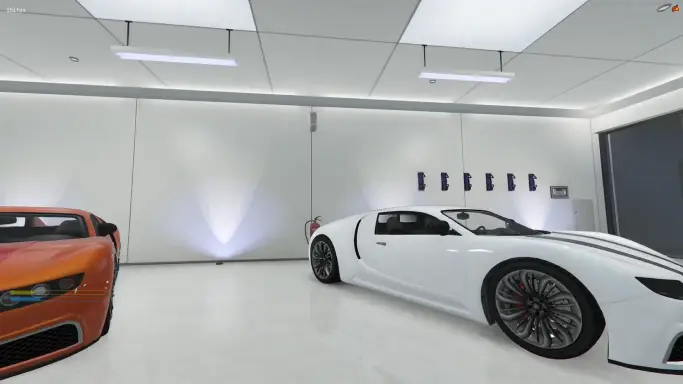
The Qbcore Interior Garage Script is a PVP-focused garage system that allows players to store any vehicle, not just owned ones. It features a 10-car interior garage, custom notifications, and a camera view when entering the garage. This script is not recommended for roleplay servers due to unrestricted vehicle storage.
The QbCore Interior Garage Script introduces immersive indoor garages for FiveM, allowing players to store, showcase, and manage their vehicles in private interiors. With seamless vehicle spawning, realistic lighting, and customization support, this script enhances roleplay by providing players with personalized garages for safe and organized vehicle storage in-game.
This is not recommend to roleplay servers, because players can store all the vehicles, not only owned and also, if the player have a car outside and takes out another, the one that is out its stored This is recommend to PVP servers
-Reorganized -Less crappy things -Removed garage location (now only use the 10 car garage)
/Removed management option
/Removed f6 menu
/Added cam to when enter garage to see all vehicles in the garage and option to cancel it when barspace is pressed (you need to add draw text of cancel key if you want)
/Some more things that i dont remember
Need help?
If you have any other questions or issues related to this product, you can contact us. This script Works well with our Qbcore Vehicle Rental Script for enhanced roleplay interactions.
Visit if you’re looking for anything regarding this RedM script
Frequently Asked Questions
How do I install Qbcore Interior Garage Script | PVP Vehicle Storage | Garage on my FiveM server?
Download after purchase, extract to resources folder, add ensure qbcore-interior-garage-script to server.cfg, restart server.
Is Qbcore Interior Garage Script | PVP Vehicle Storage | Garage compatible with QBCore and ESX?
Yes, fully compatible with QBCore, ESX, QBox, and standalone FiveM servers.
Does Qbcore Interior Garage Script | PVP Vehicle Storage | Garage include free updates?
Yes, all scripts include lifetime free updates and dedicated support.
{“@context”:”https://schema.org”,”@type”:”FAQPage”,”mainEntity”:[{“@type”:”Question”,”name”:”How do I install Qbcore Interior Garage Script | PVP Vehicle Storage | Garage on my FiveM server?”,”acceptedAnswer”:{“@type”:”Answer”,”text”:”Download after purchase, extract to your resources folder, add ‘ensure qbcore-interior-garage-script’ to server.cfg, then restart your server.”}},{“@type”:”Question”,”name”:”Is Qbcore Interior Garage Script | PVP Vehicle Storage | Garage compatible with QBCore and ESX?”,”acceptedAnswer”:{“@type”:”Answer”,”text”:”Yes, Qbcore Interior Garage Script | PVP Vehicle Storage | Garage is fully compatible with QBCore, ESX, QBox, and Standalone FiveM servers.”}},{“@type”:”Question”,”name”:”Does Qbcore Interior Garage Script | PVP Vehicle Storage | Garage include free updates?”,”acceptedAnswer”:{“@type”:”Answer”,”text”:”Yes, all FiveM scripts from fivemscripts.shop include lifetime free updates and dedicated support.”}}]}
Reviews
There are no reviews yet.
Be the first to review “Qbcore Interior Garage Script | PVP Vehicle Storage | Garage” Cancel reply





Reviews
There are no reviews yet.