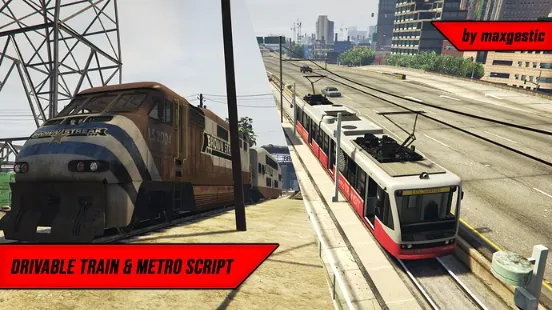
The Qbcore Metro System introduces fully functional, player-operated trains and metro systems to FiveM. Players can drive trains, transport passengers, and manage routes with realistic controls. Perfect for public transit roleplay, this script enhances immersion by offering an interactive railway system for urban and countryside travel.
Features:
- Drive Metros, Freight and Passenger Trains though Los Santos
- Passengers will be able to enter both the Metro and the normal Train
- For the Metro players will be able to enter the carriage and then sit down (Walking around freely is bad due to desync)
- In the Train carriage players will be placed in a seat and can switch seats freely
- Fully driver controllable doors on Metro
- Collision Detection to prevent Trains running into each other when there is track congestion, system knows if there is a train ahead and will stop any trains behind from getting to close
- Ticket System
- Locked Spin gates at all subway stations that only allow passthrough if player has a ticket
- Train Driver/Metro Driver Job
- Map Icons for all Metro and Train Stations
- 911 System that can be configured to call the police if someone without a ticket is on a train
- Fully customizable amount of train variations with complete support for custom models and length/amount of carriages
Update Version 1.1.1:
- Added Localisation Configuration file to allow full custom language support
Update Version 1.1.0:
- Added fully configurable station system
- Drivers will have to stop at stations for a configurable amount of time
- Passengers and Drivers will get alerts of the upcoming station when they get close
- Drivers will get strikes and get fired from driving trains if they reach a configurable amount of strikes
- Drivers will see a indicator of their next station, that will change to current station if stopped and also indicate in colour if they have stayed for long enough
- Added NPC passenger system
- NPC’s will now spawn that will board the train’s driven by players
- System is randomized so NPCs will have different models, max amount of NPCs per station, spawn locations, target platforms and carriages they will sit in
- You can configure how many max NPCs will spawn at each in game hour (for example only 2 at 4am but at 9am a max of 8 can spawn)
- Ped Models of NPC’s that can spawn can be configured
- NPC passenger system can also be fully disabled
- NPCs will walk to train for Metro system (they cant do this with train system since the platforms all do not have nav-meshes)
- Train driver will see on their screen how many NPCs are currently making their way onto the train
- Once the NPC gets to their random target station they will walk to a configurable exit and then de-spawn
- Added option to have map blips include name of stations
- Made switching seats better (now there is a cooldown so the fading screen doesnt bug out anymore)
- Bug Fixes
- Added some more comments and stuff to config files
- Split up server and client files into sperate files to make development more efficient
Need help?
If you have any other questions or issues related to this product, you can contact us. This script works well with our Qbcore Train System for enhanced roleplay communication
Visit if you’re looking for anything regarding this RedM script
Frequently Asked Questions
- How do I install Qbcore Metro System | Train & Metro Transportation with Ticketing on my FiveM server?
- Download after purchase, extract to resources folder, add ensure qbcore-metro-system to server.cfg, restart server.
- Is Qbcore Metro System | Train & Metro Transportation with Ticketing compatible with QBCore and ESX?
- Yes, fully compatible with QBCore, ESX, QBox, and standalone FiveM servers.
- Does Qbcore Metro System | Train & Metro Transportation with Ticketing include free updates?
- Yes, all scripts include lifetime free updates and dedicated support.
{“@context”:”https://schema.org”,”@type”:”FAQPage”,”mainEntity”:[{“@type”:”Question”,”name”:”How do I install Qbcore Metro System | Train & Metro Transportation with Ticketing on my FiveM server?”,”acceptedAnswer”:{“@type”:”Answer”,”text”:”Download after purchase, extract to your resources folder, add ‘ensure qbcore-metro-system’ to server.cfg, then restart your server.”}},{“@type”:”Question”,”name”:”Is Qbcore Metro System | Train & Metro Transportation with Ticketing compatible with QBCore and ESX?”,”acceptedAnswer”:{“@type”:”Answer”,”text”:”Yes, Qbcore Metro System | Train & Metro Transportation with Ticketing is fully compatible with QBCore, ESX, QBox, and Standalone FiveM servers.”}},{“@type”:”Question”,”name”:”Does Qbcore Metro System | Train & Metro Transportation with Ticketing include free updates?”,”acceptedAnswer”:{“@type”:”Answer”,”text”:”Yes, all FiveM scripts from fivemscripts.shop include lifetime free updates and dedicated support.”}}]}



Reviews
There are no reviews yet.