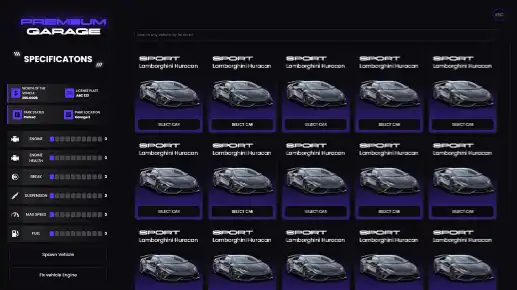
The QBCore Premium Garage script enhances vehicle storage and management with an elegant UI displaying engine, brake, suspension, and fuel details. It includes a garage center for buying, selling, and profiting from garages, an impound system for recovering vehicles, and a highly configurable system to adjust pricing, locations, and purchase options.
The QBCore Premium Garage script enhances FiveM servers with a sleek, user-friendly vehicle management system. It allows players to store, retrieve, and customize premium vehicles effortlessly. With advanced filtering, security, and categorization features, this script improves roleplay immersion, ensuring a seamless and organized vehicle experience for players and server owners.
Features
• Elegant UI featuring;
– Vehicle engine, break, suspension and fuel details
– A search bar that helps you find a vehicle easily with its model name or license plate
Garage center that gives users an ability to;
– Purchase a garage
– Sell a garage
– Make money off a garage
Impound system that helps users;
To respawn their vehicles by paying an amount of money
Config file with lots of options to configure such as;
– Enabling/Disabling garage purchase system (garage center)
– Changing the amount that is needed to respawn a vehicle at impound
– Changing the amount that is needed to fix a vehicle’s engine
– Adding/Removing new garage locations
Need help?
If you have any other questions or issues related to this product, you can contact us. This script works well with our QBCore Vehicle Contracts Script for enhanced roleplay communication
Visit if you’re looking for anything regarding this RedM script
Frequently Asked Questions
How do I install QBCore Premium Garage | Advanced Vehicle Management on my FiveM server?
Download after purchase, extract to resources folder, add ensure qbcore-premium-garage to server.cfg, restart server.
Is QBCore Premium Garage | Advanced Vehicle Management compatible with QBCore and ESX?
Yes, fully compatible with QBCore, ESX, QBox, and standalone FiveM servers.
Does QBCore Premium Garage | Advanced Vehicle Management include free updates?
Yes, all scripts include lifetime free updates and dedicated support.
{“@context”:”https://schema.org”,”@type”:”FAQPage”,”mainEntity”:[{“@type”:”Question”,”name”:”How do I install QBCore Premium Garage | Advanced Vehicle Management on my FiveM server?”,”acceptedAnswer”:{“@type”:”Answer”,”text”:”Download after purchase, extract to your resources folder, add ‘ensure qbcore-premium-garage’ to server.cfg, then restart your server.”}},{“@type”:”Question”,”name”:”Is QBCore Premium Garage | Advanced Vehicle Management compatible with QBCore and ESX?”,”acceptedAnswer”:{“@type”:”Answer”,”text”:”Yes, QBCore Premium Garage | Advanced Vehicle Management is fully compatible with QBCore, ESX, QBox, and Standalone FiveM servers.”}},{“@type”:”Question”,”name”:”Does QBCore Premium Garage | Advanced Vehicle Management include free updates?”,”acceptedAnswer”:{“@type”:”Answer”,”text”:”Yes, all FiveM scripts from fivemscripts.shop include lifetime free updates and dedicated support.”}}]}
Reviews
There are no reviews yet.
Be the first to review “QBCore Premium Garage | Advanced Vehicle Management” Cancel reply



 QBCore Premium Garage | Advanc...


Reviews
There are no reviews yet.