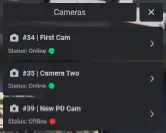
The QBCore Security Camera System enhances FiveM roleplay with real-time surveillance, allowing players to monitor live and offline cameras. Ideal for law enforcement, businesses, and private security, this script provides an intuitive UI, dynamic camera status updates, and immersive monitoring capabilities to improve security and realism in FiveM servers.
The QBCore Security Camera System adds a realistic surveillance feature to FiveM, allowing players to monitor live and offline cameras across the server. Perfect for law enforcement, businesses, and private security, this script enhances roleplay with real-time monitoring, camera status updates, and an intuitive UI for easy navigation and control.
Need help?
If you have any other questions or issues related to this product, you can contact us. This script works well with our QBCore Police Dispatch Script for enhanced roleplay communication
Visit if you’re looking for anything regarding this RedM script
Frequently Asked Questions
How do I install QBCore Security Camera System on my FiveM server?
Download after purchase, extract to resources folder, add ensure qbcore-security-camera-system to server.cfg, restart server.
Is QBCore Security Camera System compatible with QBCore and ESX?
Yes, fully compatible with QBCore, ESX, QBox, and standalone FiveM servers.
Does QBCore Security Camera System include free updates?
Yes, all scripts include lifetime free updates and dedicated support.
{“@context”:”https://schema.org”,”@type”:”FAQPage”,”mainEntity”:[{“@type”:”Question”,”name”:”How do I install QBCore Security Camera System on my FiveM server?”,”acceptedAnswer”:{“@type”:”Answer”,”text”:”Download after purchase, extract to your resources folder, add ‘ensure qbcore-security-camera-system’ to server.cfg, then restart your server.”}},{“@type”:”Question”,”name”:”Is QBCore Security Camera System compatible with QBCore and ESX?”,”acceptedAnswer”:{“@type”:”Answer”,”text”:”Yes, QBCore Security Camera System is fully compatible with QBCore, ESX, QBox, and Standalone FiveM servers.”}},{“@type”:”Question”,”name”:”Does QBCore Security Camera System include free updates?”,”acceptedAnswer”:{“@type”:”Answer”,”text”:”Yes, all FiveM scripts from fivemscripts.shop include lifetime free updates and dedicated support.”}}]}
Reviews
There are no reviews yet.
Be the first to review “QBCore Security Camera System” Cancel reply











Reviews
There are no reviews yet.