Qbcore Sit Animation Script | Custom Object Placement
The Qbcore Sit Animation Script allows players to use a variety of sitting animations for enhanced roleplay. With a vast animation library, custom object placement, and seamless integration, this script provides a natural and immersive way for players to interact with their environment. Perfect for casual chats, tense negotiations, or cinematic roleplay moments, it empowers players to bring more realism to their FiveM experience.
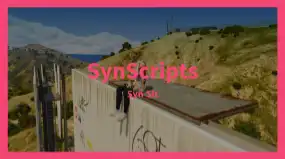
The QBCore Sit Animation Script introduces realistic sitting animations in FiveM, enabling players to sit on ledges, chairs, and objects naturally. This script enhances roleplay immersion, making interactions more lifelike and engaging. Perfect for relaxed roleplay scenarios, cinematic scenes, and immersive environments, it adds depth to character actions and animations.
Features:
Unleash Creativity: Immerse your players in a world of possibilities by designing custom animations and sitting scenarios. Tailor each experience to suit the ambience of your server – from casual conversations to dramatic confrontations.
Seamless Integration: Integrate Sit effortlessly into your existing FiveM server. With straightforward installation and clear instructions, you’ll have your animations up and running in no time.
Vast Animation Library: Choose from an extensive library of animations, ensuring that every scene captures the desired mood. Whether it’s a laid-back chat, a tense negotiation, or a moment of introspection, we’ve got animations to match.
Precise Object Placement: Our intuitive object placement system ensures that each animation feels natural and fluid. Fine-tune positions, rotations, and seating arrangements to create the most authentic experience possible.
Player Empowerment: Give your players the agency to engage with the environment like never before. They can trigger animations at their own pace, enhancing their roleplaying experience and fostering a deeper connection to the virtual world.
Need help?
If you have any other questions or issues related to this product, you can contact us. This script works well with our Qbcore Emote Script for enhanced roleplay communication
Visit if you’re looking for anything regarding this RedM script
Frequently Asked Questions
How do I install Qbcore Sit Animation Script | Custom Object Placement on my FiveM server?
Download after purchase, extract to resources folder, add ensure qbcore-sit-animation-script to server.cfg, restart server.
Is Qbcore Sit Animation Script | Custom Object Placement compatible with QBCore and ESX?
Yes, fully compatible with QBCore, ESX, QBox, and standalone FiveM servers.
Does Qbcore Sit Animation Script | Custom Object Placement include free updates?
Yes, all scripts include lifetime free updates and dedicated support.
{“@context”:”https://schema.org”,”@type”:”FAQPage”,”mainEntity”:[{“@type”:”Question”,”name”:”How do I install Qbcore Sit Animation Script | Custom Object Placement on my FiveM server?”,”acceptedAnswer”:{“@type”:”Answer”,”text”:”Download after purchase, extract to your resources folder, add ‘ensure qbcore-sit-animation-script’ to server.cfg, then restart your server.”}},{“@type”:”Question”,”name”:”Is Qbcore Sit Animation Script | Custom Object Placement compatible with QBCore and ESX?”,”acceptedAnswer”:{“@type”:”Answer”,”text”:”Yes, Qbcore Sit Animation Script | Custom Object Placement is fully compatible with QBCore, ESX, QBox, and Standalone FiveM servers.”}},{“@type”:”Question”,”name”:”Does Qbcore Sit Animation Script | Custom Object Placement include free updates?”,”acceptedAnswer”:{“@type”:”Answer”,”text”:”Yes, all FiveM scripts from fivemscripts.shop include lifetime free updates and dedicated support.”}}]}
Reviews
There are no reviews yet.
Be the first to review “Qbcore Sit Animation Script | Custom Object Placement” Cancel reply



Reviews
There are no reviews yet.