

The Qbcore Speed Traps Script is an advanced automated traffic enforcement system designed for FiveM roleplay servers. It allows server admins and law enforcement roles to set up custom speed detection zones, capturing speed violations and issuing fines automatically. This system adds realism to the RP experience, helping enforce road laws and ensuring better traffic control.
Features
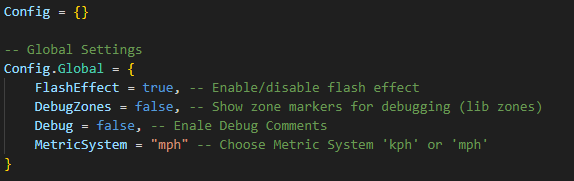
- Set your metric system
mphorkm/h. - Flash effect on the screen to simulate being flashed by radar.
- Set custom notification the player receives when money is
added,removed,has no moneyin the bank and when theradar is on cooldown.
- Ability to place radar zone anywhere with custom blips and set custom zone radius for small roads, highways and residential roads.
- Radar locations can have multiple speed threshold. One radar location can do both, add money and remove money based on config.
- Possibility to set custom sound played for each threshold player was clocked at. You can set different sound to be played when player is clocked at 50, 70, 100…
- Whitelisted Plates for any application,
Gov, Police, Ambulance… Whitelisted plates do not get flashed, no effect and sound are played when a whitelist plate drive through a radar zone. - Cooldown to prevent player from triggering traps over and over.
How it works:
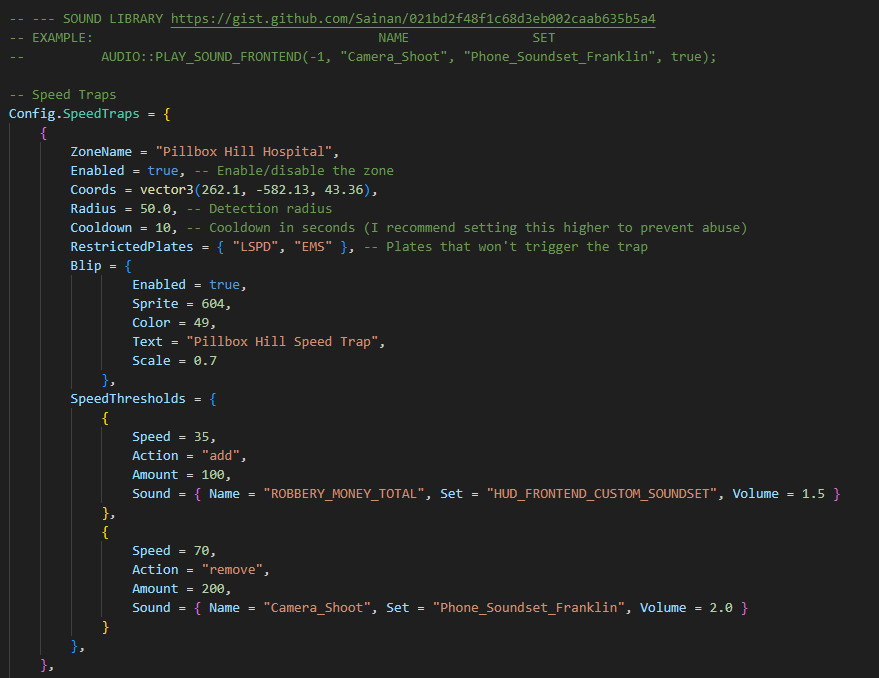
- Radar will start flashing at the speed you put in
SpeedThresholdsuntil it meets a next threshold. - If you put
Speed = 50, Action = add, Amount = 100then radar will start flashing at 50 km/h and add money and if you put anotherSpeedThresholdsafter,eg: at 70 km/hand this one remove money,Speed = 70, Action = remove, Amount = 200, at 70 km/h the radar will start removing money. - Then if you want other sounds I put a link of all the sounds from the Natives you can test and see which one you like better.
Need help?
If you have any other questions or issues related to this product, you can contact us. This script works well with our Qbcore Speed Camera Script for enhanced roleplay communication
Visit if you’re looking for anything regarding this RedM script
Frequently Asked Questions
- How do I install Qbcore Speed traps – Qbcore Speed Trap Zones on my FiveM server?
- Download after purchase, extract to resources folder, add ensure qbcore-speed-traps to server.cfg, restart server.
- Is Qbcore Speed traps – Qbcore Speed Trap Zones compatible with QBCore and ESX?
- Yes, fully compatible with QBCore, ESX, QBox, and standalone FiveM servers.
- Does Qbcore Speed traps – Qbcore Speed Trap Zones include free updates?
- Yes, all scripts include lifetime free updates and dedicated support.
{“@context”:”https://schema.org”,”@type”:”FAQPage”,”mainEntity”:[{“@type”:”Question”,”name”:”How do I install Qbcore Speed traps – Qbcore Speed Trap Zones on my FiveM server?”,”acceptedAnswer”:{“@type”:”Answer”,”text”:”Download after purchase, extract to your resources folder, add ‘ensure qbcore-speed-traps’ to server.cfg, then restart your server.”}},{“@type”:”Question”,”name”:”Is Qbcore Speed traps – Qbcore Speed Trap Zones compatible with QBCore and ESX?”,”acceptedAnswer”:{“@type”:”Answer”,”text”:”Yes, Qbcore Speed traps – Qbcore Speed Trap Zones is fully compatible with QBCore, ESX, QBox, and Standalone FiveM servers.”}},{“@type”:”Question”,”name”:”Does Qbcore Speed traps – Qbcore Speed Trap Zones include free updates?”,”acceptedAnswer”:{“@type”:”Answer”,”text”:”Yes, all FiveM scripts from fivemscripts.shop include lifetime free updates and dedicated support.”}}]}
Qbcore Speed traps – Qbc...
$12.40
Related products


You may add any content here from XStore Control Panel->Sales booster->Request a quote->Ask a question notification
At sem a enim eu vulputate nullam convallis Iaculis vitae odio faucibus adipiscing urna.
Reviews
There are no reviews yet.