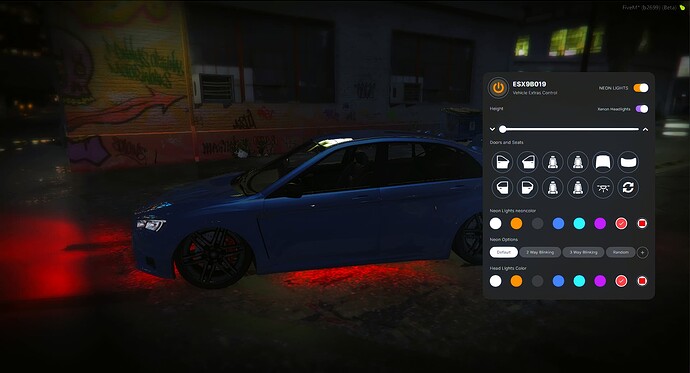
The QBCore Vehicle Controller Script enhances vehicle customization in FiveM by offering interactive control over neon lights, headlights, engine settings, and more. This user-friendly UI lets players adjust lighting, toggle doors, and modify vehicle behaviors dynamically, improving roleplay realism. Perfect for immersive gameplay, it adds advanced vehicle management options
What is this?
- this resource aims to control vehicle neon lights, xenon headlights colors, doors, seat options and many more, with easy access using Keybinds and commands.
Feature
- Standalone
- Item based Controller (optional)
- Control Doors, Seat options, Engine Switch and interior lights
- Change Neon Lights with preconfigure color and Custom color using RGB Color Picker
- Change Xenon Lights with preconfigure color and Custom color using RGB Color Picker
- Adjustable Vehicle Height
- if using item – Serial Based and Plate Locked item. (cant share to other player)
Commands
- /seat (0-4)
- /engine
- /door (-1 – 6)
- /carcontrol
Need help?
If you have any other questions or issues related to this product, you can contact us. This script works well with our Qbcore Carpaint Script for enhanced roleplay communication
Visit if you’re looking for anything regarding this RedM script
Frequently Asked Questions
- How do I install Qbcore Vehicle Controller Script | Car Control for FiveM on my FiveM server?
- Download after purchase, extract to resources folder, add ensure qbcore-vehicle-controller-script to server.cfg, restart server.
- Is Qbcore Vehicle Controller Script | Car Control for FiveM compatible with QBCore and ESX?
- Yes, fully compatible with QBCore, ESX, QBox, and standalone FiveM servers.
- Does Qbcore Vehicle Controller Script | Car Control for FiveM include free updates?
- Yes, all scripts include lifetime free updates and dedicated support.
{“@context”:”https://schema.org”,”@type”:”FAQPage”,”mainEntity”:[{“@type”:”Question”,”name”:”How do I install Qbcore Vehicle Controller Script | Car Control for FiveM on my FiveM server?”,”acceptedAnswer”:{“@type”:”Answer”,”text”:”Download after purchase, extract to your resources folder, add ‘ensure qbcore-vehicle-controller-script’ to server.cfg, then restart your server.”}},{“@type”:”Question”,”name”:”Is Qbcore Vehicle Controller Script | Car Control for FiveM compatible with QBCore and ESX?”,”acceptedAnswer”:{“@type”:”Answer”,”text”:”Yes, Qbcore Vehicle Controller Script | Car Control for FiveM is fully compatible with QBCore, ESX, QBox, and Standalone FiveM servers.”}},{“@type”:”Question”,”name”:”Does Qbcore Vehicle Controller Script | Car Control for FiveM include free updates?”,”acceptedAnswer”:{“@type”:”Answer”,”text”:”Yes, all FiveM scripts from fivemscripts.shop include lifetime free updates and dedicated support.”}}]}





Reviews
There are no reviews yet.