Qbcore weather system | FiveM Dynamic Weather & Time
The Qbcore Weather System offers dynamic and persistent weather cycles in FiveM, with smooth transitions between weather conditions like rain, thunder, and snow. It includes configurable settings, instant or gradual weather changes, and in-game UI for managing time and weather. The system is fully synced across all players, supports blackout mode, freeze time, and integrates tsunami warnings for server restarts, providing an immersive and optimized experience.
The Qbcore Weather System Script allows server administrators to customize and control the weather in FiveM. With features like dynamic weather patterns, time manipulation, and instant weather changes, this script adds realism and immersion to roleplay servers. It enables seamless transitions between various weather conditions, improving gameplay depth.
Features
Dynamic weather with natural weather cycles: We have created natural weather cycles; so when dynamic weather is enabled it will cycle through each group to make weather changes feel more natural, instead of instantly switching from sunny to thunder within seconds (but there is an option to enable instant changes). So for example the rain weather group will start with low intensity rain and build up to high intensity. It will not repeat the same cycle twice in a row.
Persistent weather: The settings (time/weather, dynamic weather, freeze time, instant time/weather change) can be saved to the settings.txt file just before a server restart, and these settings will be automatically re-applied on the next server start.
Instant or smooth forced time/weather changes: By this we are referring to when a staff member uses the in-game UI to force time/weather changes. Instant is obviously instant, but gradual means players will barely notice the changes.
Smooth time and weather changes: This is referring to normal time and weather changes a player experiences when on the server, NOT forced changes by staff when they use the in-game UI.
Time: Players will not be able to notice the time changes, the shadows never suddenly jump and are always smooth (the instant time change setting has no effect on this).
Weather: When instant weather change are disabled, a single weather change takes 3 minutes to complete, meaning you would barely notice the weather is changing or has changed because it’s so smooth.
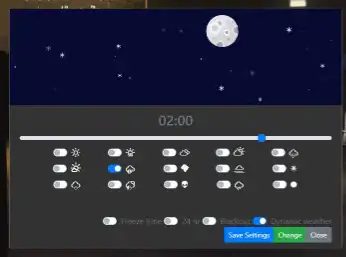
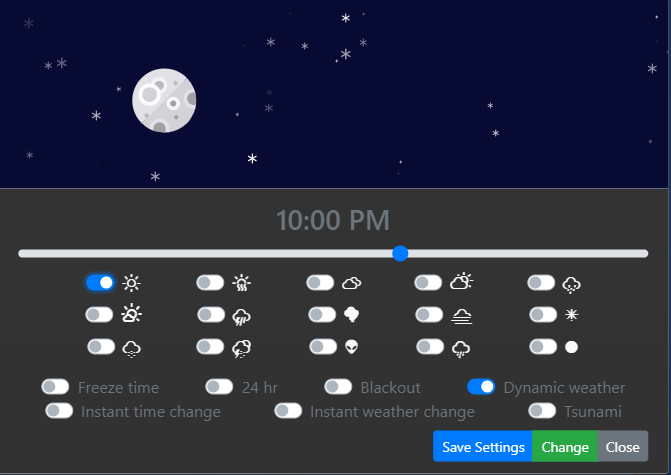
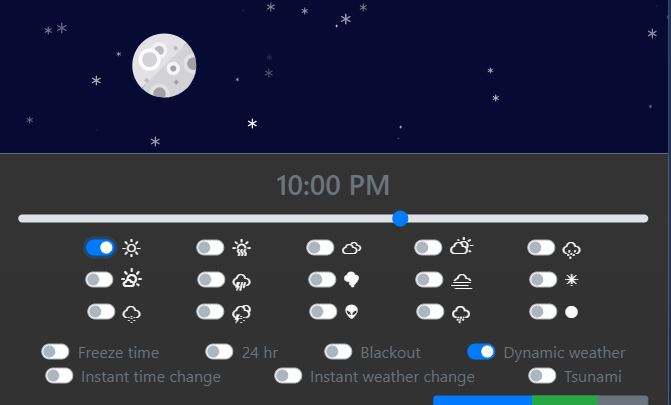
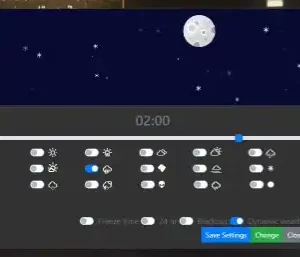
In game UI: The in game UI is where all of the main changes can be made; changing the time/weather, toggling dynamic weather, toggling blackout‘s, freezing time and toggling the instant or gradual time/weather changes.
Configurable chances to rain/thunder/snow: In the config you can choose how often you want rain, thunder or snow to happen, its based on a % chance.
Fully synced across all players: When a player enters the server their client will be fully synced with the rest of the server. On ESX/QBCore the weather will be synced after your players are loaded in by the framework to ensure multi-character resources do not cause any issues with the sync.
Shell Support: In the documentation we have provided an example of how you can trigger an event when you enter a shell, and it will set the time and weather to the optimal conditions for your client only to avoid shadows and rain/snow etc inside the shell. And you can trigger the same event when you leave the shell to re-sync your client with the rest of the server.
Blackout: On the UI you can toggle blackout mode, this will turn off every light in the city globally. There is also a new config option to allow vehicles lights to remain on during blackouts.
Freeze time: If you don’t want dynamic time, you can choose to set the time to specific time and it will never change.
Optimised: You will have no issues with optimisation as everything has been done to improve optimisation as much as possible.
Animated time slider: You can change the time by using the animated time slider on the UI.
Tsunami warning (pre-restart warning): This feature adds visual and sound effects to warn players that a server restart is about to happen while keeping it in-character. It changes the weather to Halloween, then shortly after it enables a city wide blackout and plays a tsunami warning alert sound just before the server restart.
Need help?
If you have any other questions or issues related to this product, you can contact us. This script works well with our Qbcore Time Control Script for enhanced roleplay communication
Visit if you’re looking for anything regarding this RedM script
Frequently Asked Questions
How do I install Qbcore weather system | FiveM Dynamic Weather & Time on my FiveM server?
Download after purchase, extract to resources folder, add ensure qbcore-weather-system to server.cfg, restart server.
Is Qbcore weather system | FiveM Dynamic Weather & Time compatible with QBCore and ESX?
Yes, fully compatible with QBCore, ESX, QBox, and standalone FiveM servers.
Does Qbcore weather system | FiveM Dynamic Weather & Time include free updates?
Yes, all scripts include lifetime free updates and dedicated support.
{“@context”:”https://schema.org”,”@type”:”FAQPage”,”mainEntity”:[{“@type”:”Question”,”name”:”How do I install Qbcore weather system | FiveM Dynamic Weather & Time on my FiveM server?”,”acceptedAnswer”:{“@type”:”Answer”,”text”:”Download after purchase, extract to your resources folder, add ‘ensure qbcore-weather-system’ to server.cfg, then restart your server.”}},{“@type”:”Question”,”name”:”Is Qbcore weather system | FiveM Dynamic Weather & Time compatible with QBCore and ESX?”,”acceptedAnswer”:{“@type”:”Answer”,”text”:”Yes, Qbcore weather system | FiveM Dynamic Weather & Time is fully compatible with QBCore, ESX, QBox, and Standalone FiveM servers.”}},{“@type”:”Question”,”name”:”Does Qbcore weather system | FiveM Dynamic Weather & Time include free updates?”,”acceptedAnswer”:{“@type”:”Answer”,”text”:”Yes, all FiveM scripts from fivemscripts.shop include lifetime free updates and dedicated support.”}}]}
Reviews
There are no reviews yet.
Be the first to review “Qbcore weather system | FiveM Dynamic Weather & Time” Cancel reply



 Qbcore weather system | FiveM ...




Reviews
There are no reviews yet.