Esx Advanced Crutch System | Injury & Mobility Aid for FiveM
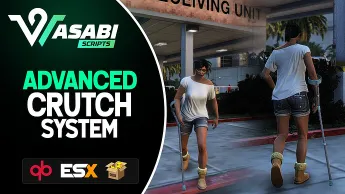
The ESX Advanced Crutch System introduces a realistic injury and mobility system in FiveM, featuring configurable crutch items, job-based medical support, timed crutch usage, animations, and props. It disables weapons and sprinting while in use, restores crutches after rejoining, removes them on death, and supports ESX/QBCore with full documentation for seamless integration.
The ESX Advanced Crutch System adds realistic crutch functionality to FiveM, allowing players with injuries to move around more naturally. This system enhances roleplay by providing players with an immersive experience of using crutches after accidents or battles. It includes easy-to-use controls and smooth animations for improved player interaction
Features
Optimized 0.00 idle / 0.01 highest
Configurable/optional jobs that can give crutch to patients
Configurable/optional usable item to give crutches to patients
Configurable max time with crutch
Exports for opening crutch give menu(Great for implementing into job menus, etc)
Exports for setting/removing crutch time
Disables use of weapons while in crutch
Disables fast sprinting while in crutch
Will restore crutches if someone leaves and comes back
Removes crutches if player dies
Animations and props
Supports ESX/QBCore out of box (or any custom framework you add to the bridge)
Full documentation
Frequent updates planned
Need help?
If you have any other questions or issues related to this product, you can contact us. This script works well with our ESX Injury System for enhanced roleplay communication
Visit if you’re looking for anything regarding this RedM script
Frequently Asked Questions
How do I install Esx Advanced Crutch System | Injury & Mobility Aid for FiveM on my FiveM server?
Download after purchase, extract to resources folder, add ensure esx-advanced-crutch-system to server.cfg, restart server.
Is Esx Advanced Crutch System | Injury & Mobility Aid for FiveM compatible with QBCore and ESX?
Yes, fully compatible with QBCore, ESX, QBox, and standalone FiveM servers.
Does Esx Advanced Crutch System | Injury & Mobility Aid for FiveM include free updates?
Yes, all scripts include lifetime free updates and dedicated support.
{“@context”:”https://schema.org”,”@type”:”FAQPage”,”mainEntity”:[{“@type”:”Question”,”name”:”How do I install Esx Advanced Crutch System | Injury & Mobility Aid for FiveM on my FiveM server?”,”acceptedAnswer”:{“@type”:”Answer”,”text”:”Download after purchase, extract to your resources folder, add ‘ensure esx-advanced-crutch-system’ to server.cfg, then restart your server.”}},{“@type”:”Question”,”name”:”Is Esx Advanced Crutch System | Injury & Mobility Aid for FiveM compatible with QBCore and ESX?”,”acceptedAnswer”:{“@type”:”Answer”,”text”:”Yes, Esx Advanced Crutch System | Injury & Mobility Aid for FiveM is fully compatible with QBCore, ESX, QBox, and Standalone FiveM servers.”}},{“@type”:”Question”,”name”:”Does Esx Advanced Crutch System | Injury & Mobility Aid for FiveM include free updates?”,”acceptedAnswer”:{“@type”:”Answer”,”text”:”Yes, all FiveM scripts from fivemscripts.shop include lifetime free updates and dedicated support.”}}]}
Reviews
There are no reviews yet.
Be the first to review “Esx Advanced Crutch System | Injury & Mobility Aid for FiveM” Cancel reply





Reviews
There are no reviews yet.