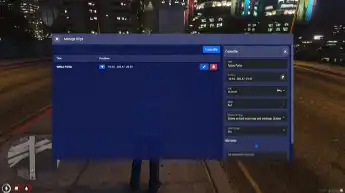
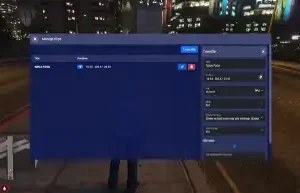
The ESX Blips Manager script allows server admins to create, edit, and manage custom map blips in FiveM. Perfect for marking businesses, police stations, hospitals, and custom locations, this script enhances roleplay navigation and organization. Featuring a user-friendly UI, it streamlines in-game location tracking and enhances server accessibility.
This script is a real time blip manager for your server. Add / Update / and Delete blips on your map and when you’re done, it will update for all players online in real time. Blips are saved to the database and it also supports webhooks for when they’re created, updated, or deleted. It also supports jobs .
New in Version 1.0.6
- UI reworked to support categories
- Ability to enable/disable categories and all blips under it with one click
- Ability to set a category for a blip from options management
- Thanks to simsonas86 for fivemerr logging support
New in Version 1.0.5
- Better handling for framework init with NUI
New in Version 1.0.4
- Moved Webhook Configuration to server-side
- Updated config to include theme variables and title for the modal window
- Removed duplicate colors in blip colors dropdown
New in Version 1.0.2
- Restrict Blips by Job
- Webhook Configuration for logs of Creation / Updating / and Deletion.
- Blip Preview, switched from a number input to a select box
- Color configuration switched from a number input to a select box.
Need help?
If you have any other questions or issues related to this product, you can contact us. This script works well with our ESX GPS Tracker Script for enhanced roleplay communication
Visit if you’re looking for anything regarding this RedM script
Frequently Asked Questions
- How do I install Esx Blips Manager Script | Blip Management on my FiveM server?
- Download after purchase, extract to resources folder, add ensure esx-blips-manager-script to server.cfg, restart server.
- Is Esx Blips Manager Script | Blip Management compatible with QBCore and ESX?
- Yes, fully compatible with QBCore, ESX, QBox, and standalone FiveM servers.
- Does Esx Blips Manager Script | Blip Management include free updates?
- Yes, all scripts include lifetime free updates and dedicated support.
{“@context”:”https://schema.org”,”@type”:”FAQPage”,”mainEntity”:[{“@type”:”Question”,”name”:”How do I install Esx Blips Manager Script | Blip Management on my FiveM server?”,”acceptedAnswer”:{“@type”:”Answer”,”text”:”Download after purchase, extract to your resources folder, add ‘ensure esx-blips-manager-script’ to server.cfg, then restart your server.”}},{“@type”:”Question”,”name”:”Is Esx Blips Manager Script | Blip Management compatible with QBCore and ESX?”,”acceptedAnswer”:{“@type”:”Answer”,”text”:”Yes, Esx Blips Manager Script | Blip Management is fully compatible with QBCore, ESX, QBox, and Standalone FiveM servers.”}},{“@type”:”Question”,”name”:”Does Esx Blips Manager Script | Blip Management include free updates?”,”acceptedAnswer”:{“@type”:”Answer”,”text”:”Yes, all FiveM scripts from fivemscripts.shop include lifetime free updates and dedicated support.”}}]}



 Esx Blips Manager Script | Bli...


Reviews
There are no reviews yet.