Esx Helicopter camera Script | Aerial Camera & Spotlight System
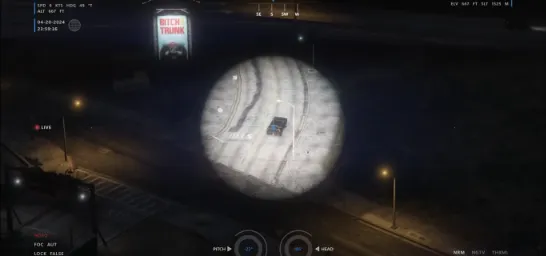
The Esx Helicopter Camera Script provides a realistic helicopter camera system with a modern UI. It allows players to control the camera, zoom, and even toggle a spotlight, cycle through vision modes (thermal/nightvision), and rappel from the helicopter. Fully customizable with key mapping and open-source code.
The ESX Helicopter Camera Script adds realistic surveillance capabilities to FiveM helicopters. With spotlight control, zoom features, and target tracking, players can perform immersive police air support operations. Ideal for law enforcement roleplay, the script integrates seamlessly with ESX and enhances tactical gameplay with high-detail aerial monitoring and pursuit support
Helicopter Camera is a standalone resource that introduces a realistic helicopter camera with a modern and real-world-inspired UI. The script can be configured more or less however you want, and the code is open source.
Most key binds are using keymapping, so each player can choose their own, or stick to the default. The default keybinds are as the following:
E – Toggle Camera
MOUSE – Move Camera (no keymapping)
SCROLL – Zoom in/out (no keymapping)
SPACE – Lock onto vehicles/peds/ground
G – Toggle Spotlight
ALT + SCROLL – Adjust spotlight brightness
CTRL + SCROLL – Adjust spotlight radius
If you have any other questions or issues related to this product, you can contact us. This script works well with our Esx Helicopter camera Script for enhanced roleplay communication
Visit if you’re looking for anything regarding this RedM script
Frequently Asked Questions
How do I install Esx Helicopter camera Script | Aerial Camera & Spotlight System on my FiveM server?
Download after purchase, extract to resources folder, add ensure esx-helicopter-camera to server.cfg, restart server.
Is Esx Helicopter camera Script | Aerial Camera & Spotlight System compatible with QBCore and ESX?
Yes, fully compatible with QBCore, ESX, QBox, and standalone FiveM servers.
Does Esx Helicopter camera Script | Aerial Camera & Spotlight System include free updates?
Yes, all scripts include lifetime free updates and dedicated support.
{“@context”:”https://schema.org”,”@type”:”FAQPage”,”mainEntity”:[{“@type”:”Question”,”name”:”How do I install Esx Helicopter camera Script | Aerial Camera & Spotlight System on my FiveM server?”,”acceptedAnswer”:{“@type”:”Answer”,”text”:”Download after purchase, extract to your resources folder, add ‘ensure esx-helicopter-camera’ to server.cfg, then restart your server.”}},{“@type”:”Question”,”name”:”Is Esx Helicopter camera Script | Aerial Camera & Spotlight System compatible with QBCore and ESX?”,”acceptedAnswer”:{“@type”:”Answer”,”text”:”Yes, Esx Helicopter camera Script | Aerial Camera & Spotlight System is fully compatible with QBCore, ESX, QBox, and Standalone FiveM servers.”}},{“@type”:”Question”,”name”:”Does Esx Helicopter camera Script | Aerial Camera & Spotlight System include free updates?”,”acceptedAnswer”:{“@type”:”Answer”,”text”:”Yes, all FiveM scripts from fivemscripts.shop include lifetime free updates and dedicated support.”}}]}
Reviews
There are no reviews yet.
Be the first to review “Esx Helicopter camera Script | Aerial Camera & Spotlight System” Cancel reply



Reviews
There are no reviews yet.