Esx Business script | GTA Online Company & Economy System
The ESX Business Script introduces a GTA Online-style business system where players can buy companies, manage resources, assign employees, conduct research, and sell products for profit. Highly configurable and immersive, it includes supply theft missions, upgrades, and multiple revenue streams for deep economic roleplay.
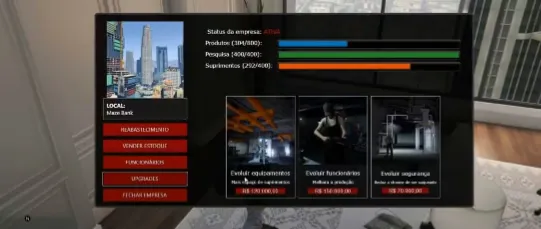
The ESX Business Script empowers players to run and manage their own businesses in FiveM. With a modern UI, players can monitor production, control supplies, hire staff, and make upgrades. It’s fully integrated with the ESX framework, bringing immersive economic simulation and enterprise roleplay to your server.
GTA Online style business system;
You can buy any company configured in the script (already has 11 configured like Maze Bank, Galaxy Nightclub, etc.);
You can work on your company to generate profits;
You must collect supplies in order to generate products and sell products to earn money;
Supplies are needed to make research modifications or generate money. They can be stolen from a variety of sources or a fee can be paid for supplies to be delivered directly to the company:
1. You can steal supplies , go to the location marked on the map and blow up the charge with C4 to collect
2. You can steal supplies , go to the marked location and steal the cargo and take it to your office garage to receive it (when you choose to steal this way, you may have NPCs trying to hinder you on your route, this option can be disabled in the configuration file)
3. You can buy supplies , and they will arrive at your company automatically within a certain time
You can allocate your employees to generate products or you can allocate your employees to generate research points;
The products can be sold to the countryside or to the city to generate money;
Research points are used to make upgrades in the company;
Extremely configurable script, all values can be easily changed in a well explained configuration file
Well optimized and without bugs;
Need help?
If you have any other questions or issues related to this product, you can contact us. This script works well with our Esx Boss Menu Script for enhanced roleplay communication
Visit if you’re looking for anything regarding this RedM script
Frequently Asked Questions
How do I install Esx Business script | GTA Online Company & Economy System on my FiveM server?
Download after purchase, extract to resources folder, add ensure esx-business-script to server.cfg, restart server.
Is Esx Business script | GTA Online Company & Economy System compatible with QBCore and ESX?
Yes, fully compatible with QBCore, ESX, QBox, and standalone FiveM servers.
Does Esx Business script | GTA Online Company & Economy System include free updates?
Yes, all scripts include lifetime free updates and dedicated support.
{“@context”:”https://schema.org”,”@type”:”FAQPage”,”mainEntity”:[{“@type”:”Question”,”name”:”How do I install Esx Business script | GTA Online Company & Economy System on my FiveM server?”,”acceptedAnswer”:{“@type”:”Answer”,”text”:”Download after purchase, extract to your resources folder, add ‘ensure esx-business-script’ to server.cfg, then restart your server.”}},{“@type”:”Question”,”name”:”Is Esx Business script | GTA Online Company & Economy System compatible with QBCore and ESX?”,”acceptedAnswer”:{“@type”:”Answer”,”text”:”Yes, Esx Business script | GTA Online Company & Economy System is fully compatible with QBCore, ESX, QBox, and Standalone FiveM servers.”}},{“@type”:”Question”,”name”:”Does Esx Business script | GTA Online Company & Economy System include free updates?”,”acceptedAnswer”:{“@type”:”Answer”,”text”:”Yes, all FiveM scripts from fivemscripts.shop include lifetime free updates and dedicated support.”}}]}
Reviews
There are no reviews yet.
Be the first to review “Esx Business script | GTA Online Company & Economy System” Cancel reply









Reviews
There are no reviews yet.