Esx Death screen Script | UI & Realistic Animation for FiveM
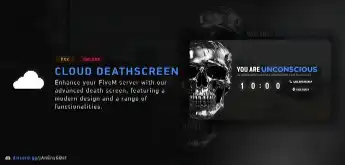
ESX Death Screen Script provides a modern, fully customizable death screen for FiveM. It includes optional voice chat deafening, a realistic death animation, and Vue.js frontend for a seamless user experience. The script offers enhanced performance, improved customization, and fine-tuning options to match server requirements.
The ESX Death Screen Script enhances roleplay immersion in FiveM by adding a dynamic and fully customizable death screen. Players experience realistic effects, timers, and respawn options after being incapacitated. Compatible with EMS and hospital systems, it improves emergency response scenarios and overall roleplay depth in serious RP servers.
Features
Sleek, modern design for an upgraded user experience
Fully customizable to match your server’s requirements
Optional voice chat deafening system
Optional realistic death animation
What’s New
Full Code Rewrite: The script has been completely recoded from the ground up, offering improved performance and reliability.
Vue.js Frontend: The entire frontend is now built with Vue.js, providing a modern, responsive, and seamless user interface.
Enhanced Customization Options: Fine-tune the deathscreen to better suit your server’s needs with more configuration flexibility.
Need help?
If you have any other questions or issues related to this product, you can contact us. This script works well with our ESX Advanced Death System for enhanced roleplay communication
Visit if you’re looking for anything regarding this RedM script
Frequently Asked Questions
How do I install Esx Death screen Script | UI & Realistic Animation for FiveM on my FiveM server?
Download after purchase, extract to resources folder, add ensure esx-death-screen-script to server.cfg, restart server.
Is Esx Death screen Script | UI & Realistic Animation for FiveM compatible with QBCore and ESX?
Yes, fully compatible with QBCore, ESX, QBox, and standalone FiveM servers.
Does Esx Death screen Script | UI & Realistic Animation for FiveM include free updates?
Yes, all scripts include lifetime free updates and dedicated support.
{“@context”:”https://schema.org”,”@type”:”FAQPage”,”mainEntity”:[{“@type”:”Question”,”name”:”How do I install Esx Death screen Script | UI & Realistic Animation for FiveM on my FiveM server?”,”acceptedAnswer”:{“@type”:”Answer”,”text”:”Download after purchase, extract to your resources folder, add ‘ensure esx-death-screen-script’ to server.cfg, then restart your server.”}},{“@type”:”Question”,”name”:”Is Esx Death screen Script | UI & Realistic Animation for FiveM compatible with QBCore and ESX?”,”acceptedAnswer”:{“@type”:”Answer”,”text”:”Yes, Esx Death screen Script | UI & Realistic Animation for FiveM is fully compatible with QBCore, ESX, QBox, and Standalone FiveM servers.”}},{“@type”:”Question”,”name”:”Does Esx Death screen Script | UI & Realistic Animation for FiveM include free updates?”,”acceptedAnswer”:{“@type”:”Answer”,”text”:”Yes, all FiveM scripts from fivemscripts.shop include lifetime free updates and dedicated support.”}}]}
Reviews
There are no reviews yet.
Be the first to review “Esx Death screen Script | UI & Realistic Animation for FiveM” Cancel reply


 Esx Death screen Script | UI &...

Reviews
There are no reviews yet.