Esx Door lock Script | Customizable Door Access | Locking System
The ESX Door Lock Script allows you to easily add and configure doors, manage door states (locked, unlocked, or locking), and customize door behavior. It supports automatic opening for garage doors, persistent door states, job-based access permissions, lockpicking, and item authorization. The script offers full customization with audio and visuals, using NUI for door state display and optimized performance.
The Esx Door lock Script with Better 3D Text provides a realistic door locking system for your FiveM server. Players can lock/unlock gates and doors using keybindings and visually enhanced 3D text prompts. Supports job-based access, police or gang zones, and smooth syncing for immersive and secure roleplay scenarios.
Easily add and configure new doors! Example video
Use the /newdoor command to automatically create a new entry on the DoorList.
No more SetEntityHeading and FreezeEntityPosition natives.
Doors in range are assigned a doorHash, used with AddDoorToSystem.
Doors are assigned a state depending on if they are unlocked, locked, or locking with DoorSystemSetDoorState.
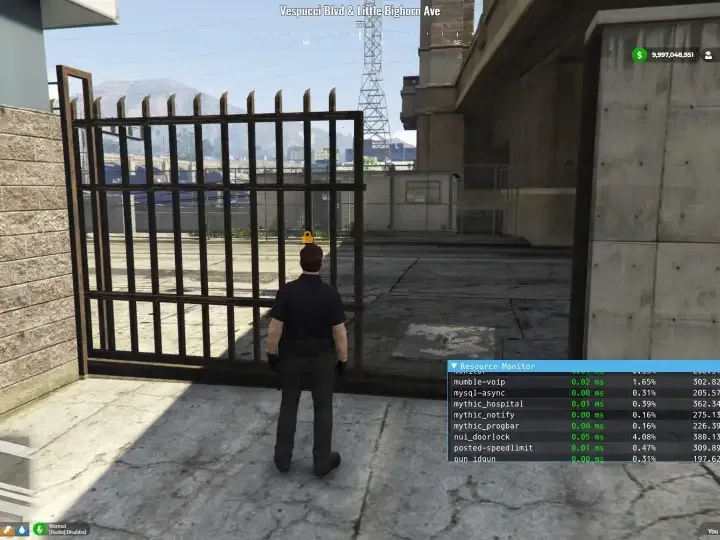
Garage doors and gates can be locked and will properly move into the correct position.
If a player comes into range of an unlocked automatic door like this, it will open appropriately.
The state of the door is drawn into the world using NUI, meaning full customisation of the appearance and content.
By default, icons from font-awesome are being displayed; but there is support for images with this method.
Customisable audio playback! Modify the lock and unlock sound on a door-by-door basic.
Improved performance by utilising threads and functions where appropriate.
Instead of updating the door list every X seconds, your position will be compared to where the last update occured and update when appropriate.
The state of doors is only checked while in range, and the number of checks per loop depends on the state of the door.
Persistent door states! Door states are saved when the resource stops, then loaded back up on start.
States.json will auto-generate if the file does not exist.
Config for both Community MRPD and gabz_MRPD
Just choose which config file to use and delete the one you are not using.
Set door access permissions
Set multiple jobs to be authorised to use a door, with the minimum required grade authorizedJobs = {['police']=0, ['offpolice']=0}
Allow the door to be lockpicked with lockpick = true
Allow item authorisation with items = {'key_master', 'key_lspd'} etc.
Need help?
If you have any other questions or issues related to this product, you can contact us. This script works well with our Esx Property Script for enhanced roleplay communication
Visit if you’re looking for anything regarding this RedM script
Frequently Asked Questions
How do I install Esx Door lock Script | Customizable Door Access | Locking System on my FiveM server?
Download after purchase, extract to resources folder, add ensure esx-door-lock-script to server.cfg, restart server.
Is Esx Door lock Script | Customizable Door Access | Locking System compatible with QBCore and ESX?
Yes, fully compatible with QBCore, ESX, QBox, and standalone FiveM servers.
Does Esx Door lock Script | Customizable Door Access | Locking System include free updates?
Yes, all scripts include lifetime free updates and dedicated support.
{“@context”:”https://schema.org”,”@type”:”FAQPage”,”mainEntity”:[{“@type”:”Question”,”name”:”How do I install Esx Door lock Script | Customizable Door Access | Locking System on my FiveM server?”,”acceptedAnswer”:{“@type”:”Answer”,”text”:”Download after purchase, extract to your resources folder, add ‘ensure esx-door-lock-script’ to server.cfg, then restart your server.”}},{“@type”:”Question”,”name”:”Is Esx Door lock Script | Customizable Door Access | Locking System compatible with QBCore and ESX?”,”acceptedAnswer”:{“@type”:”Answer”,”text”:”Yes, Esx Door lock Script | Customizable Door Access | Locking System is fully compatible with QBCore, ESX, QBox, and Standalone FiveM servers.”}},{“@type”:”Question”,”name”:”Does Esx Door lock Script | Customizable Door Access | Locking System include free updates?”,”acceptedAnswer”:{“@type”:”Answer”,”text”:”Yes, all FiveM scripts from fivemscripts.shop include lifetime free updates and dedicated support.”}}]}
Reviews
There are no reviews yet.
Be the first to review “Esx Door lock Script | Customizable Door Access | Locking System” Cancel reply



 Esx Door lock Script | Customi...


Reviews
There are no reviews yet.