The ESX Global Chat Remover Script allows server owners to disable or customize global chat visibility in FiveM. It separates in-character and out-of-character text, improving immersion and preventing metagaming. Ideal for serious RP servers, the script enhances chat clarity and ensures communication stays true to the roleplay environment.
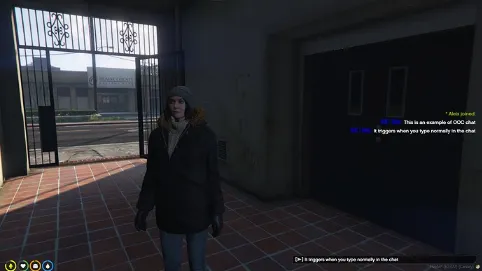
It also adds a config file where you can enable/disable an OOC chat that triggers when you don’t type any command in the chat, so anything you type in the chat will be formatted as OOC.
I know there are plenty of chat alternatives out there, but I didn’t find any simple script that only adds that functionality and plug & play, so I made it. With this small solution, you can easily combine it with other scripts and frameworks without breaking functionalities.
Currently, these are the configurable values:
Config.EnableChatOOC = true
Config.Prefix = 'OOC | '
Config.PrefixColor = { 0, 0, 255}
Config.ChatDistance = 20.0
Config.EnableGlobalOOC = false
Need help?
If you have any other questions or issues related to this product, you can contact us. This script works well with our Esx Ticket Manager Script for enhanced roleplay communication
Visit if you’re looking for anything regarding this RedM script
Frequently Asked Questions
- How do I install Esx Global Chat Remover | Custom OOC Chat System on my FiveM server?
- Download after purchase, extract to resources folder, add ensure esx-global-chat-remover to server.cfg, restart server.
- Is Esx Global Chat Remover | Custom OOC Chat System compatible with QBCore and ESX?
- Yes, fully compatible with QBCore, ESX, QBox, and standalone FiveM servers.
- Does Esx Global Chat Remover | Custom OOC Chat System include free updates?
- Yes, all scripts include lifetime free updates and dedicated support.
{“@context”:”https://schema.org”,”@type”:”FAQPage”,”mainEntity”:[{“@type”:”Question”,”name”:”How do I install Esx Global Chat Remover | Custom OOC Chat System on my FiveM server?”,”acceptedAnswer”:{“@type”:”Answer”,”text”:”Download after purchase, extract to your resources folder, add ‘ensure esx-global-chat-remover’ to server.cfg, then restart your server.”}},{“@type”:”Question”,”name”:”Is Esx Global Chat Remover | Custom OOC Chat System compatible with QBCore and ESX?”,”acceptedAnswer”:{“@type”:”Answer”,”text”:”Yes, Esx Global Chat Remover | Custom OOC Chat System is fully compatible with QBCore, ESX, QBox, and Standalone FiveM servers.”}},{“@type”:”Question”,”name”:”Does Esx Global Chat Remover | Custom OOC Chat System include free updates?”,”acceptedAnswer”:{“@type”:”Answer”,”text”:”Yes, all FiveM scripts from fivemscripts.shop include lifetime free updates and dedicated support.”}}]}






Reviews
There are no reviews yet.