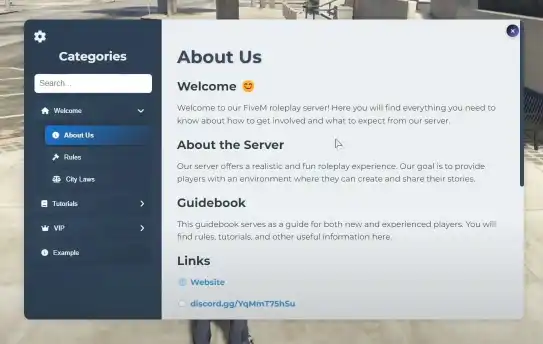
The ESX Guidebook Script offers a customizable, interactive guidebook with categorized content, smooth UI animations, and a search bar for easy navigation. It supports external links, displays full-screen images, and allows for UI customization, including font selection and text size adjustments. The script features a modern, responsive design and includes convenient keyboard shortcuts.
The ESX Guidebook Script serves as an interactive guide for players in FiveM, offering helpful information, tutorials, and tips within the game. Perfect for new players, it provides essential roleplay instructions, server rules, and in-game mechanics. Fully customizable, this script improves the player experience and streamlines the onboarding process.
Features List
Categorization and Subcategories:
Supports main categories and their subcategories.
Dynamic content loading when clicking on a category or subcategory.
Animations:
Animations for opening and closing the UI.
Smooth transitions for expanding and collapsing categories.
Search Bar:
Search functionality for categories and subcategories.
UI Settings:
Ability to change text size.
Toggle to show or hide the search bar.
Selection from multiple fonts for the UI.
External Links:
Open external links in a modal window with a close option.
Doesn’t work with all websites.
Images:
Ability to display images in full screen when clicked.
Keyboard Shortcuts:
Close the UI by pressing the Escape key.
Style and Design:
Modern and clean design.
Responsive and user-friendly interface.
Need help?
If you have any other questions or issues related to this product, you can contact us. This script works well with our ESX Info Panel Script for enhanced roleplay communication
Visit if you’re looking for anything regarding this RedM script
Frequently Asked Questions
How do I install Esx Guidebook Script | Interactive Content Navigation & UI FiveM on my FiveM server?
Download after purchase, extract to resources folder, add ensure esx-guidebook-script to server.cfg, restart server.
Is Esx Guidebook Script | Interactive Content Navigation & UI FiveM compatible with QBCore and ESX?
Yes, fully compatible with QBCore, ESX, QBox, and standalone FiveM servers.
Does Esx Guidebook Script | Interactive Content Navigation & UI FiveM include free updates?
Yes, all scripts include lifetime free updates and dedicated support.
{“@context”:”https://schema.org”,”@type”:”FAQPage”,”mainEntity”:[{“@type”:”Question”,”name”:”How do I install Esx Guidebook Script | Interactive Content Navigation & UI FiveM on my FiveM server?”,”acceptedAnswer”:{“@type”:”Answer”,”text”:”Download after purchase, extract to your resources folder, add ‘ensure esx-guidebook-script’ to server.cfg, then restart your server.”}},{“@type”:”Question”,”name”:”Is Esx Guidebook Script | Interactive Content Navigation & UI FiveM compatible with QBCore and ESX?”,”acceptedAnswer”:{“@type”:”Answer”,”text”:”Yes, Esx Guidebook Script | Interactive Content Navigation & UI FiveM is fully compatible with QBCore, ESX, QBox, and Standalone FiveM servers.”}},{“@type”:”Question”,”name”:”Does Esx Guidebook Script | Interactive Content Navigation & UI FiveM include free updates?”,”acceptedAnswer”:{“@type”:”Answer”,”text”:”Yes, all FiveM scripts from fivemscripts.shop include lifetime free updates and dedicated support.”}}]}
Reviews
There are no reviews yet.
Be the first to review “Esx Guidebook Script | Interactive Content Navigation & UI FiveM” Cancel reply






Reviews
There are no reviews yet.