Esx Inventory Managment Script | FiveM Player & Vehicle Storage
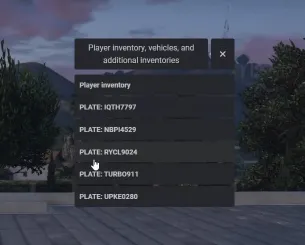
The ESX Inventory Management Script gives admins complete control over player inventories, vehicles, and storage units in real-time. With features like online/offline functionality, automatic saving, and detailed logging, it ensures seamless management and security for all inventory-related tasks on your ESX server.
The Esx Inventory Managment Script streamlines item storage, retrieval, and organization in GTA V RP servers. With an intuitive interface, players can manage personal items, weapons, and resources efficiently. This script integrates seamlessly with the ESX framework, enhancing roleplay realism and server performance. Perfect for advanced FiveM roleplay environments worldwide.
Features:
Comprehensive Admin Control:
Easily manage player inventories in real-time.
Open, edit, or reset inventories for players, vehicles, and storage units.
Versatile Inventory Support:
Player Inventories: View and modify items held by players.
Storage Units: Manage lockers, house stashes, warehouses, and other storage spaces.
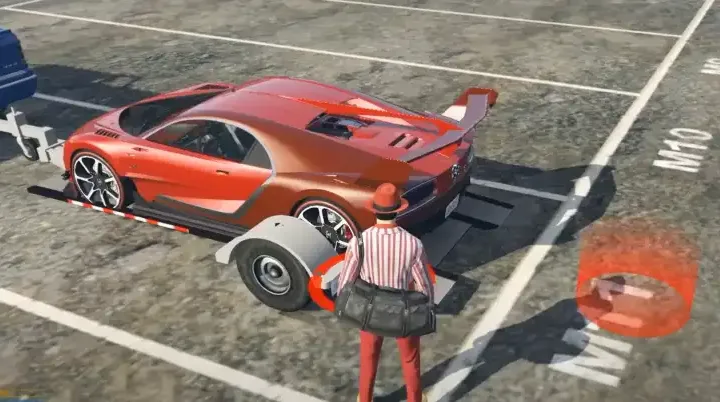
Vehicle Storage: Edit trunks and gloveboxes tied to specific vehicles.
Online & Offline Functionality:
Manage inventories whether players are online or disconnected.
Ensure data accessibility for all admin tasks.
Automatic Saving:
All changes made to inventories are automatically saved to the database.
Vehicle Integration:
Seamless management of storage compartments for cars, including trunks and gloveboxes.
Integrated with existing database systems for consistent data handling.
Advanced Logging:
Every admin action is logged for transparency and accountability.
Maintain a secure and trustworthy environment on your server.
Need help?
If you have any other questions or issues related to this product, you can contact us. This script works well with our Esx Weight System for enhanced roleplay communication
Visit if you’re looking for anything regarding this RedM script
Frequently Asked Questions
How do I install Esx Inventory Managment Script | FiveM Player & Vehicle Storage on my FiveM server?
Download after purchase, extract to resources folder, add ensure esx-inventory-managment-script to server.cfg, restart server.
Is Esx Inventory Managment Script | FiveM Player & Vehicle Storage compatible with QBCore and ESX?
Yes, fully compatible with QBCore, ESX, QBox, and standalone FiveM servers.
Does Esx Inventory Managment Script | FiveM Player & Vehicle Storage include free updates?
Yes, all scripts include lifetime free updates and dedicated support.
{“@context”:”https://schema.org”,”@type”:”FAQPage”,”mainEntity”:[{“@type”:”Question”,”name”:”How do I install Esx Inventory Managment Script | FiveM Player & Vehicle Storage on my FiveM server?”,”acceptedAnswer”:{“@type”:”Answer”,”text”:”Download after purchase, extract to your resources folder, add ‘ensure esx-inventory-managment-script’ to server.cfg, then restart your server.”}},{“@type”:”Question”,”name”:”Is Esx Inventory Managment Script | FiveM Player & Vehicle Storage compatible with QBCore and ESX?”,”acceptedAnswer”:{“@type”:”Answer”,”text”:”Yes, Esx Inventory Managment Script | FiveM Player & Vehicle Storage is fully compatible with QBCore, ESX, QBox, and Standalone FiveM servers.”}},{“@type”:”Question”,”name”:”Does Esx Inventory Managment Script | FiveM Player & Vehicle Storage include free updates?”,”acceptedAnswer”:{“@type”:”Answer”,”text”:”Yes, all FiveM scripts from fivemscripts.shop include lifetime free updates and dedicated support.”}}]}
Reviews
There are no reviews yet.
Be the first to review “Esx Inventory Managment Script | FiveM Player & Vehicle Storage” Cancel reply




Reviews
There are no reviews yet.