The ESX Job Manager Script provides an advanced job and employee management system for FiveM. It features a boss menu for hiring and promotions, a clothing menu, an on/off duty system, stash storage, farming management, door control, user management, and vehicle administration. Ideal for roleplay servers, it enhances job-related interactions and server organization.
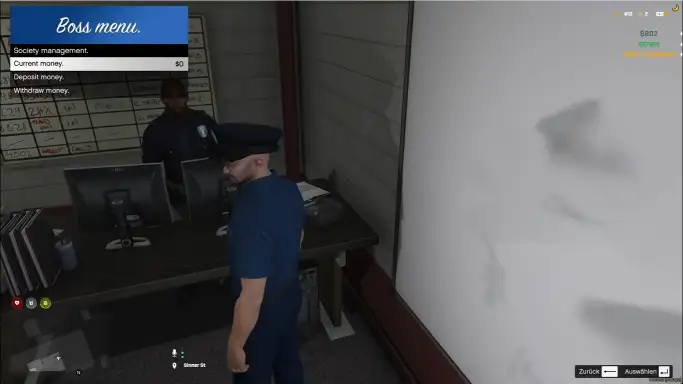
The ESX Job Manager Script allows job bosses to manage society funds, deposit/withdraw money, and oversee organization operations. This interactive UI enhances roleplay by providing an immersive way to handle job finances and responsibilities. Compatible with ESX framework, it’s essential for servers needing structured business and job management.
Features
Job-Manager
Manage all job-related tasks with ease:
BossMenu (Grade Accessible): Allow players with the right grades to manage employee hiring, firing, and promotions.
Clothing Menu (With Outfits): Customize outfits for employees based on their job roles.
Employee System for Admins: Manage employees, adjust job details, and more, all within a dedicated admin system.
Grade Management Tab: A simple interface to modify or set grades within jobs, ensuring a proper role hierarchy.
Standalone On/Off Duty System: Enable employees to clock in and out independently, with full export support.
Stash System: (Upcoming) Role-specific storage solutions for each job.
Farming Spots: Manage farming locations with tools, grade requirements, and customizable code execution.
Custom Animations/Cutscenes: Add unique animations or cutscenes to farming activities.
Additional Features: Expanding functionality based on community feedback.
Door-Manager
Control and manage doors within your server:
Door Creation: Easily create and customize doors in the game world.
Keypad and Lock Systems: Secure doors with keypads or specific items, adding layers of security.
Advanced Customization: Tailor door functionalities to your server’s unique requirements.
User-Manager
Effortlessly manage your users:
User Management: Edit and manage ESX-related user data directly from the interface.
Admin Controls: Full control over user attributes, job assignments, inventory, and more.
Vehicle-Manager
Handle all your server’s vehicle needs:
Vehicle Management: Grant, remove, or edit vehicles easily.
Customization Options: Tailor vehicles to match your RP however you would like
Need help?
If you have any other questions or issues related to this product, you can contact us. This script works well with our ESX Business System for enhanced roleplay communication
Visit if you’re looking for anything regarding this RedM script
Frequently Asked Questions
How do I install Esx Job Manager Script | Advanced Job & Employee Management on my FiveM server?
Download after purchase, extract to resources folder, add ensure esx-job-manager-script to server.cfg, restart server.
Is Esx Job Manager Script | Advanced Job & Employee Management compatible with QBCore and ESX?
Yes, fully compatible with QBCore, ESX, QBox, and standalone FiveM servers.
Does Esx Job Manager Script | Advanced Job & Employee Management include free updates?
Yes, all scripts include lifetime free updates and dedicated support.
{“@context”:”https://schema.org”,”@type”:”FAQPage”,”mainEntity”:[{“@type”:”Question”,”name”:”How do I install Esx Job Manager Script | Advanced Job & Employee Management on my FiveM server?”,”acceptedAnswer”:{“@type”:”Answer”,”text”:”Download after purchase, extract to your resources folder, add ‘ensure esx-job-manager-script’ to server.cfg, then restart your server.”}},{“@type”:”Question”,”name”:”Is Esx Job Manager Script | Advanced Job & Employee Management compatible with QBCore and ESX?”,”acceptedAnswer”:{“@type”:”Answer”,”text”:”Yes, Esx Job Manager Script | Advanced Job & Employee Management is fully compatible with QBCore, ESX, QBox, and Standalone FiveM servers.”}},{“@type”:”Question”,”name”:”Does Esx Job Manager Script | Advanced Job & Employee Management include free updates?”,”acceptedAnswer”:{“@type”:”Answer”,”text”:”Yes, all FiveM scripts from fivemscripts.shop include lifetime free updates and dedicated support.”}}]}
Reviews
There are no reviews yet.
Be the first to review “Esx Job Manager Script | Advanced Job & Employee Management” Cancel reply







Reviews
There are no reviews yet.