Esx Kevlar Script | Customizable Armor Vests with Autosave
The Esx Kevlar Script provides players with four types of Kevlar vests (small, medium, full, and police) for different purposes. It features an auto-save and auto-load function to restore the last worn Kevlar when joining the game. Players can configure keybindings, armor values, and skin for each Kevlar type, making the script highly customizable and open-source.
The ESX Kevlar Script allows players to equip different levels of body armor, such as small, medium, or heavy kevlar. It integrates with damage systems to reduce incoming damage and enhance survival in combat situations. Perfect for police, gangs, or military RP, it adds tactical depth to FiveM gameplay.
Kevlar script with four types of Vests for almost every purpose,
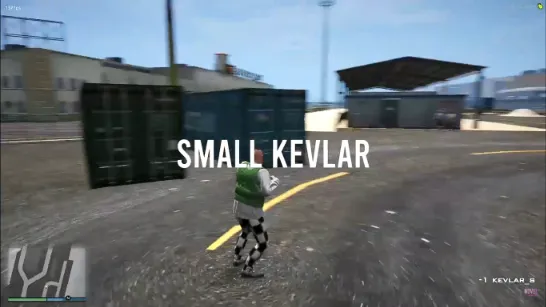
small Kevlar,
medium Kevlar,
full Kevlar,
police Kevlar,
The Kevlar script has an auto save-feature, which time can of course be freely configured. When the player join’s the script will automatically load his last worn kevlar. You can configure custom keybindings as well if you want to. Also you have the choice to configure everything else in the script-code. The script is open source!
⚙️ Functions:
⚒️ You can configure everything
⚒️ Autosave-feature, saves the last worn kevlar from all Players
⚒️ Autoload-feature, when the player join’s he gets his kevlar right back
⚒️ De/activate keybind
⚒️ Four types of kevlar
⚒️ Change the armour values each kevlar
⚒️ Change the skin for the armour
⚒️ Get the highest type of kevlar that you have in your inventory by pressing a specific custom key bind you’ve set
Need help?
If you have any other questions or issues related to this product, you can contact us. This script works well with our Esx Armor Vest Script for enhanced roleplay communication
Visit if you’re looking for anything regarding this RedM script
Frequently Asked Questions
How do I install Esx Kevlar Script | Customizable Armor Vests with Autosave on my FiveM server?
Download after purchase, extract to resources folder, add ensure esx-kevlar-script to server.cfg, restart server.
Is Esx Kevlar Script | Customizable Armor Vests with Autosave compatible with QBCore and ESX?
Yes, fully compatible with QBCore, ESX, QBox, and standalone FiveM servers.
Does Esx Kevlar Script | Customizable Armor Vests with Autosave include free updates?
Yes, all scripts include lifetime free updates and dedicated support.
{“@context”:”https://schema.org”,”@type”:”FAQPage”,”mainEntity”:[{“@type”:”Question”,”name”:”How do I install Esx Kevlar Script | Customizable Armor Vests with Autosave on my FiveM server?”,”acceptedAnswer”:{“@type”:”Answer”,”text”:”Download after purchase, extract to your resources folder, add ‘ensure esx-kevlar-script’ to server.cfg, then restart your server.”}},{“@type”:”Question”,”name”:”Is Esx Kevlar Script | Customizable Armor Vests with Autosave compatible with QBCore and ESX?”,”acceptedAnswer”:{“@type”:”Answer”,”text”:”Yes, Esx Kevlar Script | Customizable Armor Vests with Autosave is fully compatible with QBCore, ESX, QBox, and Standalone FiveM servers.”}},{“@type”:”Question”,”name”:”Does Esx Kevlar Script | Customizable Armor Vests with Autosave include free updates?”,”acceptedAnswer”:{“@type”:”Answer”,”text”:”Yes, all FiveM scripts from fivemscripts.shop include lifetime free updates and dedicated support.”}}]}
Reviews
There are no reviews yet.
Be the first to review “Esx Kevlar Script | Customizable Armor Vests with Autosave” Cancel reply



Reviews
There are no reviews yet.