
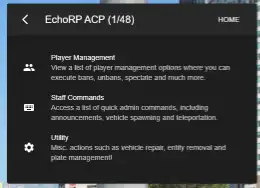
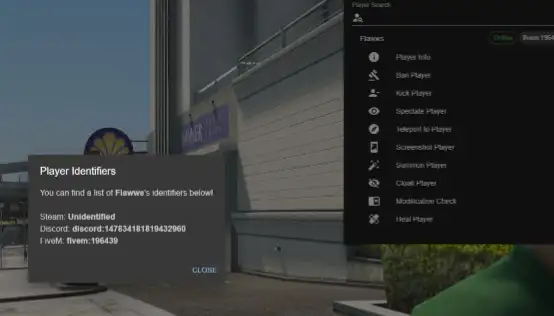
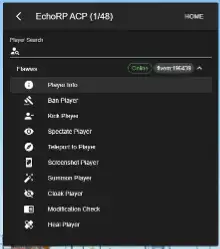
The ESX Modern Admin Menu Script provides staff with an intuitive interface for player management, quick commands, and utility actions. Ban, spectate, repair vehicles, or make announcements easily. Designed for performance and user-friendliness, it’s the ideal all-in-one tool for server administrators running FiveM roleplay communities with ESX framework.
Features
- Actually working ban checks
- Wonderful Material UI design
- Utilises React Redux, React Router & Typescript

- Player list showing both online and disconnected players
- Search for players in the player list
- Ban, kick, spectate, teleportation and modification checks are included
- Forbidden client events check (check for conflicting events)
- Banned client command list (check for conflicting commands)
- NoClip similar to vMenu, just without the extra stuff, could probably expand this later.
- A force ban option which allows you to ban offline players
- Each ban has a ban ID which you can unban using the “Pardon Player” option
- Vehicle spawning, using server-side natives.
- Change weather options.
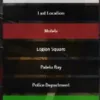
- Waypoint and coordinate teleportation, using vector values.
- Utility action such as vehicle repair, plate change, clear area, entity deletion and much more
- Weapon drop disabling & no vehicle rewards.
Need help?
If you have any other questions or issues related to this product, you can contact us. This script works well with our Esx Ticket Manager Script for enhanced roleplay communication
Visit if you’re looking for anything regarding this RedM script
Frequently Asked Questions
- How do I install Esx Modern Admin menu | Admin Tools & Server Management on my FiveM server?
- Download after purchase, extract to resources folder, add ensure esx-modern-admin-menu to server.cfg, restart server.
- Is Esx Modern Admin menu | Admin Tools & Server Management compatible with QBCore and ESX?
- Yes, fully compatible with QBCore, ESX, QBox, and standalone FiveM servers.
- Does Esx Modern Admin menu | Admin Tools & Server Management include free updates?
- Yes, all scripts include lifetime free updates and dedicated support.
{“@context”:”https://schema.org”,”@type”:”FAQPage”,”mainEntity”:[{“@type”:”Question”,”name”:”How do I install Esx Modern Admin menu | Admin Tools & Server Management on my FiveM server?”,”acceptedAnswer”:{“@type”:”Answer”,”text”:”Download after purchase, extract to your resources folder, add ‘ensure esx-modern-admin-menu’ to server.cfg, then restart your server.”}},{“@type”:”Question”,”name”:”Is Esx Modern Admin menu | Admin Tools & Server Management compatible with QBCore and ESX?”,”acceptedAnswer”:{“@type”:”Answer”,”text”:”Yes, Esx Modern Admin menu | Admin Tools & Server Management is fully compatible with QBCore, ESX, QBox, and Standalone FiveM servers.”}},{“@type”:”Question”,”name”:”Does Esx Modern Admin menu | Admin Tools & Server Management include free updates?”,”acceptedAnswer”:{“@type”:”Answer”,”text”:”Yes, all FiveM scripts from fivemscripts.shop include lifetime free updates and dedicated support.”}}]}
Esx Modern Admin menu | Admin ...
$14.70
Related products




You may add any content here from XStore Control Panel->Sales booster->Request a quote->Ask a question notification
At sem a enim eu vulputate nullam convallis Iaculis vitae odio faucibus adipiscing urna.
Reviews
There are no reviews yet.