Esx Squid Game Script | FiveM “Red Light, Green Light” Minigame
The ESX Squid Game Script brings the iconic “Red Light, Green Light” game to FiveM, allowing players to participate in a high-stakes challenge for rewards. The game features a detailed modeled location, synchronized doll movements, NPC guards, movement detection, and an automated shooting system. It supports ESX, QB, vRP, and standalone frameworks while remaining highly optimized for performance.
“Red Light, Green Light” is a popular game, often played in different countries. How the game is played varies throughout different regions of the world.
To participate you need to go on specific location and wait a countdown till the game starts. Game collects $100 fee from all participants before it starts and pay rewards to winners at the end. When the game starts no more players can join until the game finishes.
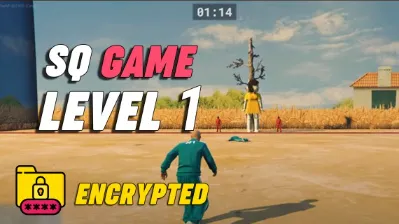
Game starts and all players teleport into location. There you see a closed cube-like space with a gigang Doll far away and two guards standing nearby.
Game countdown starts, players goal is to reach the end of location (Doll’s position) before countdown is over and players also are now allowed to move while Doll is watching.
Features
Location. Modeled location with attention to details such as doors, walls, guns, tree, doll and guards.
Doll. Doll sign the song and rotating head smooth and synchronised between all players;
NPC’s. NPC’s can be spawned in the role of players. They are shown in a showcase video.
Song. Song edited with the help of Adobe Audition to provide the best quality.
Detection of players movement.If the doll’s watching and you move – game over.
Guns on walls. Guns automatically shooting straight into players.
Outfits config. Participants and guards clothes included, but you can set up your custom clothes as as well via config file.
Countdown. When the countdown is over and you are not in the finish zone – game over.
Multiplayer. Many players can join the game together.
Optimized. CPU and Network Optimized. If you are not in game, the script takes less than 0.01 ms and a few requests sended over the network.
Plug-and-play. Standalone, ESX , QB and vRP frameworks are supported;
Need help?
If you have any other questions or issues related to this product, you can contact us. This script works well with our ESX Game Mode System for enhanced roleplay communication
Visit if you’re looking for anything regarding this RedM script
Frequently Asked Questions
How do I install Esx Squid Game Script | FiveM “Red Light, Green Light” Minigame on my FiveM server?
Download after purchase, extract to resources folder, add ensure esx-squid-game-script to server.cfg, restart server.
Is Esx Squid Game Script | FiveM “Red Light, Green Light” Minigame compatible with QBCore and ESX?
Yes, fully compatible with QBCore, ESX, QBox, and standalone FiveM servers.
Does Esx Squid Game Script | FiveM “Red Light, Green Light” Minigame include free updates?
Yes, all scripts include lifetime free updates and dedicated support.
{“@context”:”https://schema.org”,”@type”:”FAQPage”,”mainEntity”:[{“@type”:”Question”,”name”:”How do I install Esx Squid Game Script | FiveM “Red Light, Green Light” Minigame on my FiveM server?”,”acceptedAnswer”:{“@type”:”Answer”,”text”:”Download after purchase, extract to your resources folder, add ‘ensure esx-squid-game-script’ to server.cfg, then restart your server.”}},{“@type”:”Question”,”name”:”Is Esx Squid Game Script | FiveM “Red Light, Green Light” Minigame compatible with QBCore and ESX?”,”acceptedAnswer”:{“@type”:”Answer”,”text”:”Yes, Esx Squid Game Script | FiveM “Red Light, Green Light” Minigame is fully compatible with QBCore, ESX, QBox, and Standalone FiveM servers.”}},{“@type”:”Question”,”name”:”Does Esx Squid Game Script | FiveM “Red Light, Green Light” Minigame include free updates?”,”acceptedAnswer”:{“@type”:”Answer”,”text”:”Yes, all FiveM scripts from fivemscripts.shop include lifetime free updates and dedicated support.”}}]}
Reviews
There are no reviews yet.
Be the first to review “Esx Squid Game Script | FiveM “Red Light, Green Light” Minigame” Cancel reply





Reviews
There are no reviews yet.