Qbcore Weather Sync Script | Time Weather & Time Integration
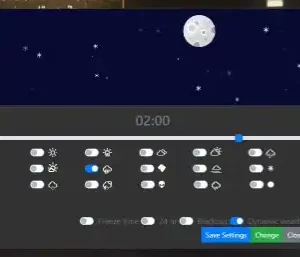
The Qbcore Weather Sync Script integrates real-world weather and time into FiveM by using two APIs to fetch live weather and timezone data. It sends automatic notifications with the current weather forecast and time every 5 minutes (configurable). The script is optimized for performance (0.03 ms idle) and works as a drag-and-drop solution for any QBCore server after setting up API keys.
Qbcore Weather Sync Script brings a realistic and synchronized weather system to FiveM servers. It ensures all players experience the same dynamic weather changes, from clear skies to storms. Perfect for immersive roleplay, aviation realism, and environmental storytelling, this script enhances gameplay with accurate weather transitions and real-time effects.
Featuring full real weather and time by using 2 different api to pull weather and timezone information from the real world and implement this into your server, also sends a notification every 5mins (can be changed) that will display the current time and current weather forecast
Almost Fully rewritten serverside code of qb-weathersync to accomplish this while keeping all exports of the original intact so this will drag and drop into any qbcore server after setting api keys
Both api keys will be required for this script to work
0.03 ms idle (mainly for the api http requests)
This is my first time ive worked with api and weather events so please be kind
Need help?
If you have any other questions or issues related to this product, you can contact us. This script Works well with our Qbcore Dynamic Water Script for enhanced roleplay interactions.
Visit if you’re looking for anything regarding this RedM script
Frequently Asked Questions
How do I install Qbcore Weather Sync Script | Time Weather & Time Integration on my FiveM server?
Download after purchase, extract to resources folder, add ensure qbcore-weather-sync-script to server.cfg, restart server.
Is Qbcore Weather Sync Script | Time Weather & Time Integration compatible with QBCore and ESX?
Yes, fully compatible with QBCore, ESX, QBox, and standalone FiveM servers.
Does Qbcore Weather Sync Script | Time Weather & Time Integration include free updates?
Yes, all scripts include lifetime free updates and dedicated support.
{“@context”:”https://schema.org”,”@type”:”FAQPage”,”mainEntity”:[{“@type”:”Question”,”name”:”How do I install Qbcore Weather Sync Script | Time Weather & Time Integration on my FiveM server?”,”acceptedAnswer”:{“@type”:”Answer”,”text”:”Download after purchase, extract to your resources folder, add ‘ensure qbcore-weather-sync-script’ to server.cfg, then restart your server.”}},{“@type”:”Question”,”name”:”Is Qbcore Weather Sync Script | Time Weather & Time Integration compatible with QBCore and ESX?”,”acceptedAnswer”:{“@type”:”Answer”,”text”:”Yes, Qbcore Weather Sync Script | Time Weather & Time Integration is fully compatible with QBCore, ESX, QBox, and Standalone FiveM servers.”}},{“@type”:”Question”,”name”:”Does Qbcore Weather Sync Script | Time Weather & Time Integration include free updates?”,”acceptedAnswer”:{“@type”:”Answer”,”text”:”Yes, all FiveM scripts from fivemscripts.shop include lifetime free updates and dedicated support.”}}]}
Reviews
There are no reviews yet.
Be the first to review “Qbcore Weather Sync Script | Time Weather & Time Integration” Cancel reply




 Qbcore Weather Sync Script | ...



Reviews
There are no reviews yet.