Esx Radial clothing menu | Clothing System for FiveM
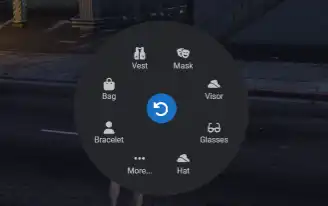
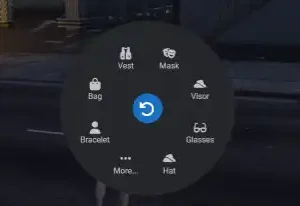
The ESX Radial Clothing Menu allows players to easily navigate through clothing categories like tops, bottoms, shoes, and accessories. It features menu editing options, supports any notification system, and can be toggled via commands. The script is open-source, framework-agnostic, and multilingual with zero resource usage.
The ESX Radial Clothing Menu Script introduces an intuitive wardrobe management system in GTA V RP. Players can easily equip or remove accessories, hats, glasses, and more through a radial menu. With a user-friendly interface and seamless FiveM integration, this script enhances roleplay immersion and outfit customization options.
Categorization of Clothing Items:
The menu is divided into different categories such as tops, bottoms, shoes, accessories, etc. This allows players to navigate easily and find the desired clothing items.
Menu Editing Options:
You don’t want, for example, for users to be able to remove watches? Simply deactivate it via the configuration.
Any Notify system possible:
Switch your notify system in seconds and utilize your preferred notification system.
The entire menu also functions as commands:
Don’t want to use the menu? Toggle your clothing using commands.
Some other points from the script
Open source
Works for any framework
Usage 0.00 MS.
Translatable into all languages with two languages available as standard: English and German
Need help?
If you have any other questions or issues related to this product, you can contact us. This script Works well with our ESX Wardrobe System for enhanced roleplay interactions.
Visit if you’re looking for anything regarding this RedM script
Frequently Asked Questions
How do I install Esx Radial clothing menu | Clothing System for FiveM on my FiveM server?
Download after purchase, extract to resources folder, add ensure esx-radial-clothing-menu to server.cfg, restart server.
Is Esx Radial clothing menu | Clothing System for FiveM compatible with QBCore and ESX?
Yes, fully compatible with QBCore, ESX, QBox, and standalone FiveM servers.
Does Esx Radial clothing menu | Clothing System for FiveM include free updates?
Yes, all scripts include lifetime free updates and dedicated support.
{“@context”:”https://schema.org”,”@type”:”FAQPage”,”mainEntity”:[{“@type”:”Question”,”name”:”How do I install Esx Radial clothing menu | Clothing System for FiveM on my FiveM server?”,”acceptedAnswer”:{“@type”:”Answer”,”text”:”Download after purchase, extract to your resources folder, add ‘ensure esx-radial-clothing-menu’ to server.cfg, then restart your server.”}},{“@type”:”Question”,”name”:”Is Esx Radial clothing menu | Clothing System for FiveM compatible with QBCore and ESX?”,”acceptedAnswer”:{“@type”:”Answer”,”text”:”Yes, Esx Radial clothing menu | Clothing System for FiveM is fully compatible with QBCore, ESX, QBox, and Standalone FiveM servers.”}},{“@type”:”Question”,”name”:”Does Esx Radial clothing menu | Clothing System for FiveM include free updates?”,”acceptedAnswer”:{“@type”:”Answer”,”text”:”Yes, all FiveM scripts from fivemscripts.shop include lifetime free updates and dedicated support.”}}]}
Reviews
There are no reviews yet.
Be the first to review “Esx Radial clothing menu | Clothing System for FiveM” Cancel reply


 Esx Radial clothing menu | Cl...





Reviews
There are no reviews yet.