Esx Pause Menu | UI, Server Info & Player Stats for FiveM
The ESX Pause Menu script enhances the in-game experience by providing a fully customizable pause menu that allows players to access essential information, server details, and quick navigation options in one place.
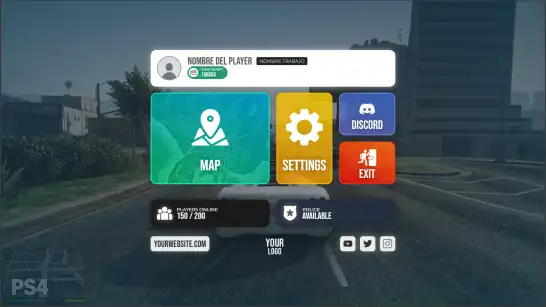
The ESX Pause Menu script for FiveM enhances the in-game interface with a sleek, interactive pause menu. It offers quick access to the map, settings, Discord, and server information. Designed for immersive roleplay, this user-friendly UI improves navigation, server engagement, and overall gameplay experience in GTA 5 RP.
Features
Quickly access the in-game map to navigate the FiveM world with ease.
Settings: Customize your gaming experience with configuration options available in an instant.
Player Information: Get details about your character and their current status.
Server Information: Stay informed about key server details such as the name, IP address, and connection speed.
Player Count: View the real-time number of players online.
Police Status: Check if the police are available on the server at that moment.
Discord: Access the Discord server with a single click to stay in touch with the community. Server Logo: prominently display your server’s logo in the menu.
Social Media: Connect your social media accounts to keep your players updated.
Need help?
If you have any other questions or issues related to this product, you can contact us. This script works well with our ESX Advanced Pause Menu for enhanced roleplay communication
Visit if you’re looking for anything regarding this RedM script
Frequently Asked Questions
How do I install Esx Pause Menu | UI, Server Info & Player Stats for FiveM on my FiveM server?
Download after purchase, extract to resources folder, add ensure esx-pause-menu-v5 to server.cfg, restart server.
Is Esx Pause Menu | UI, Server Info & Player Stats for FiveM compatible with QBCore and ESX?
Yes, fully compatible with QBCore, ESX, QBox, and standalone FiveM servers.
Does Esx Pause Menu | UI, Server Info & Player Stats for FiveM include free updates?
Yes, all scripts include lifetime free updates and dedicated support.
{“@context”:”https://schema.org”,”@type”:”FAQPage”,”mainEntity”:[{“@type”:”Question”,”name”:”How do I install Esx Pause Menu | UI, Server Info & Player Stats for FiveM on my FiveM server?”,”acceptedAnswer”:{“@type”:”Answer”,”text”:”Download after purchase, extract to your resources folder, add ‘ensure esx-pause-menu-v5’ to server.cfg, then restart your server.”}},{“@type”:”Question”,”name”:”Is Esx Pause Menu | UI, Server Info & Player Stats for FiveM compatible with QBCore and ESX?”,”acceptedAnswer”:{“@type”:”Answer”,”text”:”Yes, Esx Pause Menu | UI, Server Info & Player Stats for FiveM is fully compatible with QBCore, ESX, QBox, and Standalone FiveM servers.”}},{“@type”:”Question”,”name”:”Does Esx Pause Menu | UI, Server Info & Player Stats for FiveM include free updates?”,”acceptedAnswer”:{“@type”:”Answer”,”text”:”Yes, all FiveM scripts from fivemscripts.shop include lifetime free updates and dedicated support.”}}]}
Reviews
There are no reviews yet.
Be the first to review “Esx Pause Menu | UI, Server Info & Player Stats for FiveM” Cancel reply





Reviews
There are no reviews yet.